Licenses cannot be managed correctly because the Apple VPP token is also registered on another management server
App licenses can no longer be managed because the VPP token that was in use in BizMobile Go! has been registered in another MDM or used in Apple Configurator.
How VPP management works
The app licenses managed in BizMobile Go! are purchased on the Apple Business (formerly Apple Business Manager) site and assigned to an "organizational unit" on the same Apple Business site.
The VPP token links that Apple Business "organizational unit" to BizMobile Go!. Because they are linked by the VPP token, you can check (and correctly manage) the purchased, in-use, and remaining available licenses in the BizMobile Go! admin console.
For this reason, a VPP token cannot be shared among multiple MDMs. It can be registered (used) in only one MDM environment. If you need to use VPP with multiple MDMs, create an "organizational unit" for each MDM environment on the Apple Business site, and link each "organizational unit" to its MDM with a VPP token.
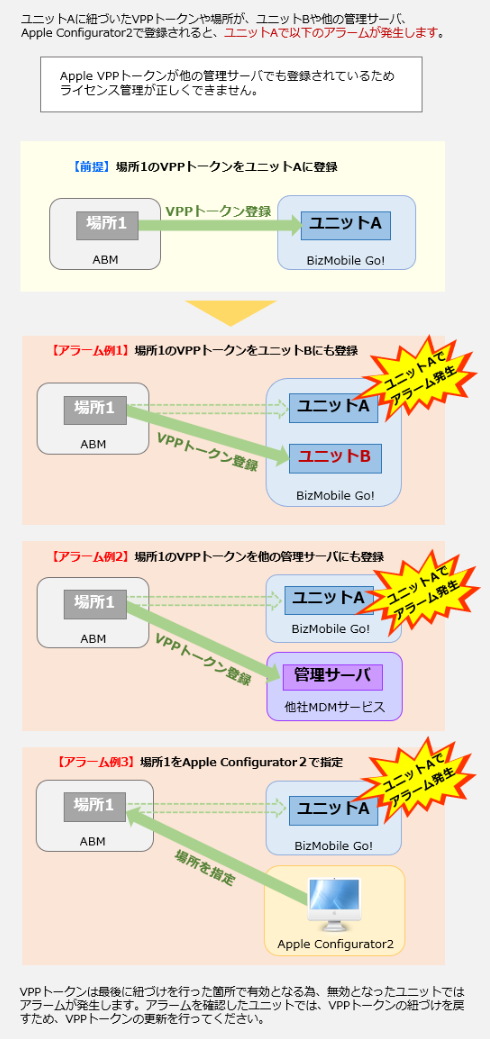
Current VPP management status
Because the VPP token is not managed correctly, the VPP token has become invalid and the license management features cannot be used.
- Apps purchased on the Apple Business site cannot be newly imported into BizMobile Go! (they cannot be made managed apps)
- VPP apps managed in BizMobile Go! cannot be newly distributed to (installed on) devices
- Licenses are not reclaimed even if a managed VPP app is removed from a device
Solution
Restore VPP management to a normal state using one of the following methods.
- Restore license management using the previous "organizational unit" (restore the location and token): Download the VPP token from the Apple Business site and upload it to the admin console. For the VPP token renewal procedure, see Renew the VPP token.
- Manage licenses using a new "organizational unit" (change the location and token): Create a new "organizational unit" on the Apple Business site, download its VPP token, and upload it to the admin console. If you renew the VPP token with a newly created "organizational unit", apps purchased with the old VPP token cannot be updated. For how to create an "organizational unit", see this official Apple guide.
When using a newly created "organizational unit", either purchase new app licenses or transfer app licenses from the previous "organizational unit". For how to transfer app licenses, see this official Apple guide.
Last updated: July 29, 2026