What can I do with OS update management for iPhone/iPad?
The OS update management features include a feature that prompts OS updates and features that restrict them.
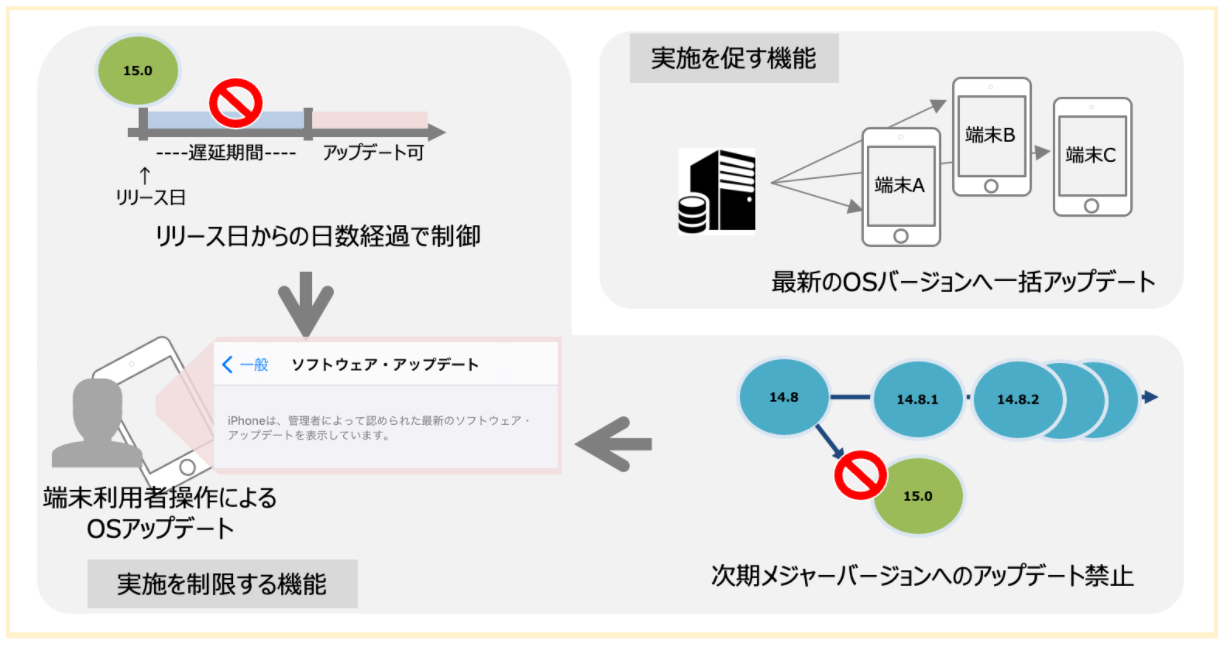
Features that prompt updates
- Template
OS Auto Update:
You can send a command to update to the latest OS version.
Features that restrict updates
-
Profile Restrictions payload
Defer Software Updates:
You can delay OS updates performed by device users. You can specify the available OS versions by the number of days (up to 90) since release.
For example, if a 30-day deferral is applied to an iPhone running iOS 16.6.1, the iPhone user can update to iOS 16.7 on October 21, 2023, which is 30 days after Apple publicly released the iOS 16.7 update. -
Profile
OS Update Pathpayload:
You can prohibit major version updates from iOS / iPadOS 16.x to 17.x.
Even in this case, minor version updates of iOS / iPadOS 16 are still possible, so important security updates can be installed.
For details on OS update path control, see also this FAQ.
Last updated: November 9, 2023