Windows Deployment Flow
Check the deployment pattern
Use the following chart to find the best deployment pattern for your devices.
There are two deployment patterns.
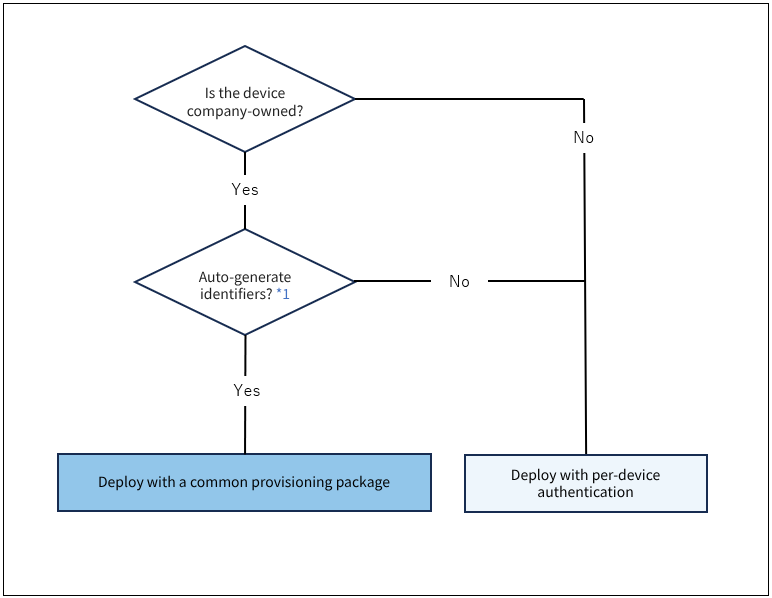
*1
With the automatic identifier generation feature, you do not need to prepare identifiers linked one-to-one with your managed devices in advance. Device identifiers (normally 6-digit numbers) are generated and assigned automatically at enrollment. This feature is well suited to setting up many devices at once.
Because devices are managed by identifier, the identifier cannot be changed once enrollment is complete and operation has started.
To use this feature, create a common provisioning package.
Automatically create devices with Windows common provisioning package authentication
Deployment method after you decide the pattern
-
Deployment flow using per-device authentication
In this method, you prepare device information individually in advance. Each device enrolls (checks in) to the MDM using the method you prepared for it (an individual provisioning package, Key / Code, and so on). -
Deployment flow using common provisioning package authentication
Using a common provisioning package automates part of the enrollment to the MDM.
In advance, create a common provisioning package in BizMobile Go! that defines the conditions for automatically creating devices.
Download the common provisioning package to the devices, for example as an email attachment or from your own site. To enroll a device in the MDM (check in), simply install the downloaded package on the device. Check-in to BizMobile Go! then completes automatically.
When check-in succeeds, the device information is created automatically under the conditions set in the common provisioning package, so you do not need to create individual management information for each device.