Banned App Detection
This feature lets device administrators specify apps that are prohibited on devices managed by BizMobile Go!, and sends an alarm notification when use of those apps is detected.
To use it, you create and specify either a whitelist (a list of only the applications allowed to be installed) or a blacklist (a list of the applications you want to prohibit).
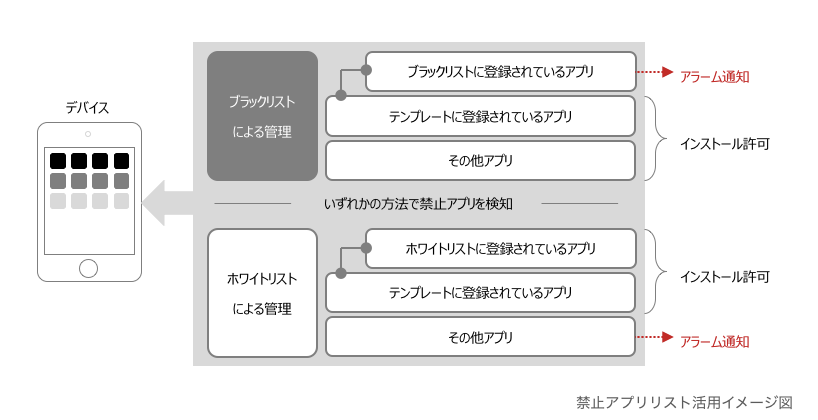
The banned app detection feature detects apps that are not allowed and notifies you with an alarm. It does not delete the apps that are not allowed from the device or hide them on the device.
To configure settings that hide apps that are not allowed, see Restrict app usage (supervised devices only).
It also does not distribute the apps registered in a whitelist.
Overview of Whitelists and Blacklists
BizMobile Go! uses Whitelist and Blacklist as the mechanism for detecting banned apps.
When you register a whitelist or blacklist in the template you want to use for banned app detection, BizMobile Go! checks the application installation status of the devices to which that template is applied.
- A whitelist is a list of allowed applications. It detects whether any application that is not in the whitelist is installed on a managed device.
- A blacklist is a list of applications that are not allowed. It detects whether any application that is in the blacklist is installed on a managed device.
In either case, when installation of an application that is not allowed is detected, an alarm is raised when the device information is synchronized.
After you check the alarm, you need to take action, such as contacting the device user.
Use a whitelist if you want to allow only a specific group of apps, and a blacklist if you want to disallow only a specific group of apps.
Only one list type (whitelist or blacklist) can be set for a template, but you can register multiple lists of the same type.
- Not allowed: Registering whitelist A and blacklist A in one template
- Allowed: Registering whitelist A and whitelist B in one template
- Allowed: Registering blacklist A and blacklist B in one template
- Create a whitelist or blacklist
For the steps to create a whitelist or blacklist, see the page above.