Event (One Time Only)
On the Event page, you can check the operations performed by operators on the admin console and the logs of executed events.
The following table shows the trigger and details of each event.
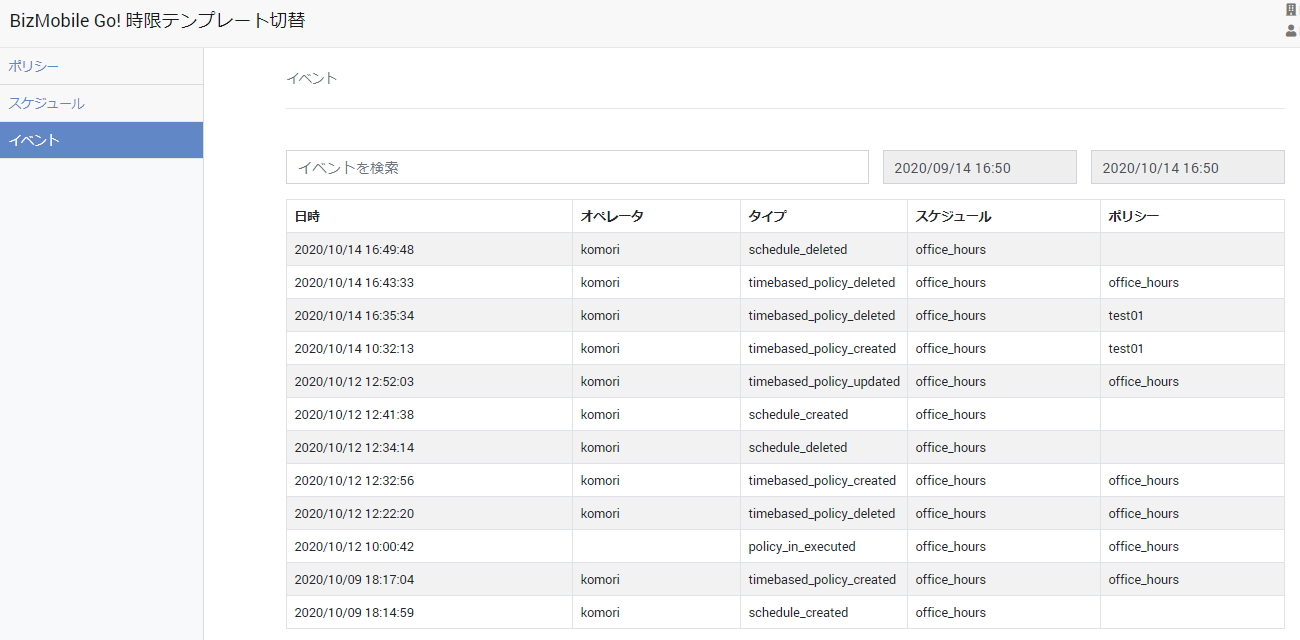
| Trigger | Date and time | Operator | Type | Schedule | Policy |
|---|---|---|---|---|---|
| Policy created | Date and time the policy was created | ID of the operator who created the policy | timebased_policy_created | Specified schedule | Created policy |
| Policy edited | Date and time the policy was edited | ID of the operator who edited the policy | timebased_policy_updated | Specified schedule | Target policy |
| Policy deleted | Date and time the policy was deleted | ID of the operator who deleted the policy | timebased_policy_deleted | Specified schedule | Target policy |
| Schedule created | Date and time the schedule was created | ID of the operator who created the schedule | schedule_created | Created schedule | - |
| Schedule edited | Date and time the schedule was edited | ID of the operator who edited the schedule | schedule_updated | Target schedule | - |
| Schedule deleted | Date and time the schedule was deleted | ID of the operator who deleted the schedule | schedule_deleted | Target schedule | - |
| Switch by a "one time only" schedule | Date and time the switch was executed | - | policy_executed | Target schedule | Target policy |
Check the switch
When the server finishes the switch process, a "policy_executed" log is recorded.
If the event log shows the switch but you cannot confirm it on the device, check the device's response status in CONFIG > Device > Detail > Last Access.
For the switch to take place on the device, the device must access the server.
If Last Access is not updated, see the FAQ below.
FAQ: The device's last access date and time is not updated