Check the Deployment Pattern for Android Devices
Use the following chart to find the most suitable management mode and deployment pattern for your devices, based on how they were purchased, their current state, and whether zero-touch is available.
There are two management modes (Device Owner and Work Profile) and four deployment patterns.
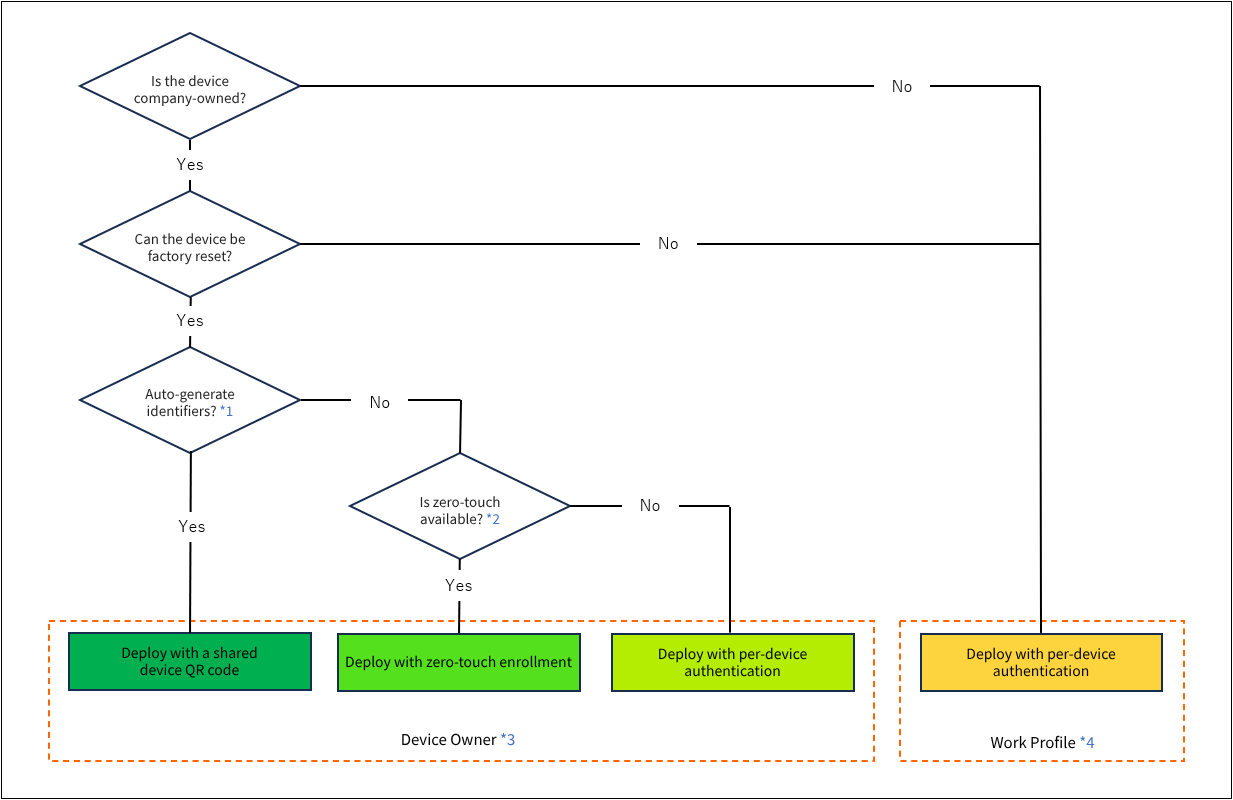
\*1
With the automatic identifier generation feature, you do not need to prepare an identifier mapped one-to-one to each managed device in advance. At enrollment, a device identifier (based on a 6-digit number) and a user are generated and assigned automatically, making this feature well suited to deploying a large number of devices.
In addition, simply scanning a shared QR code completes everything from Device Owner setup to enrollment automatically, which greatly reduces the workload during deployment.
Because devices are managed by identifier, the identifier cannot be changed once enrollment is complete and operation has started.
*2
Zero-touch is a Google feature that helps automate the deployment and MDM enrollment of Android devices.
For an overview of zero-touch and whether you can use it, see Zero-touch.
*3
You can use the entire device as a work area.
This puts the entire device under the company's control and allows broader management.
Device Owner requires the device to be factory reset.
*4
The device is divided into a personal area (user profile) and a work area (Work Profile). Work data and applications are placed under the company's management, while applications and data in other personal accounts are managed by the individual.