Set Default Configuration per App
On the application create/edit screen, you can set the values to distribute as the default configuration.
The default configuration set for an application is distributed to all devices assigned to the templates to which this app is assigned.
-
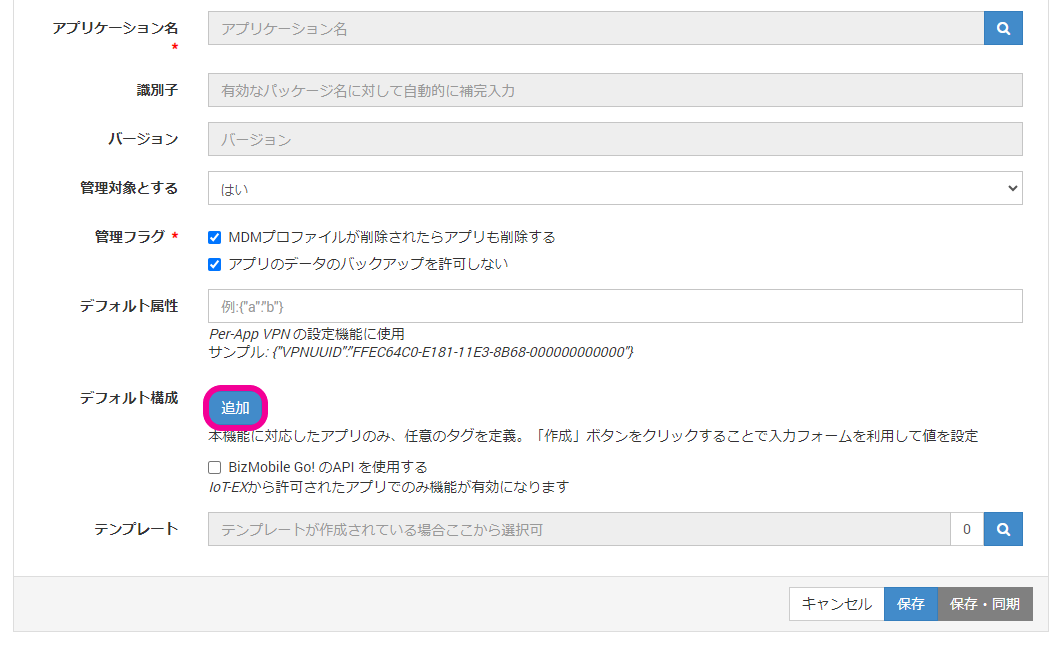
From CONFIG → Applications, open the application creation screen or the edit screen of an existing application.
-
Click
Default Configuration→ [Add].
-
Enter the values to distribute.
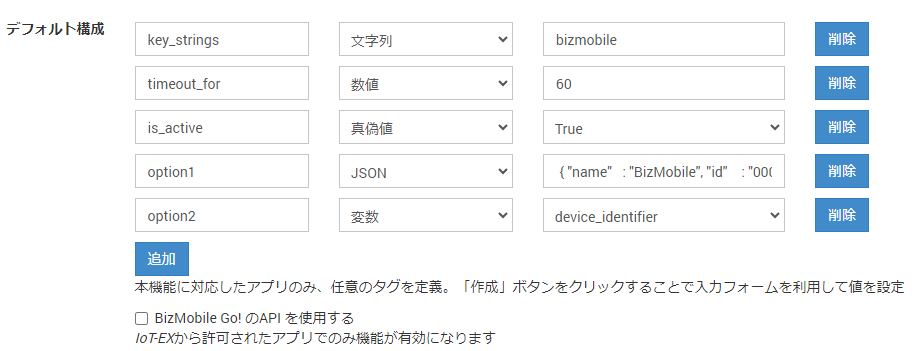
Values you can enterKey Type Value Up to 255 characters String Up to 1,024 characters Number Up to 14 characters
Numbers onlyBoolean - True
- False
JSON Up to 1,024 characters
JSON format onlyVariable - device_identifier: The device's
Identifier - device_id: A device ID that is unique in the system (included in the URL of the device detail screen)
- device_did: A device UID that is unique in the system (cannot be checked in the admin console)
- device_name: The device's
Name on Device(a value obtained from the device) - device_display_name: The device's
Name - device_imei: The device's
IMEI - device_serial_number: The device's
Serial Number - user_email: The
Email Addressof theUserassigned to the device - user_username: The
Usernameof theUserassigned to the device - unit_unitid: Unit ID
-
To discard what you entered, click [Cancel]. To register what you entered, click [Save].