VPP (Volume Purchase Program)
What Is VPP?
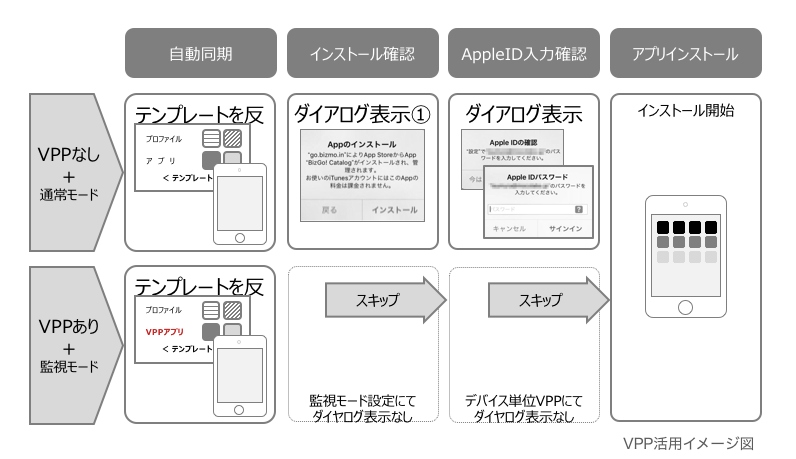
VPP is a feature that lets companies and educational institutions purchase and manage app licenses in bulk on the Apple Business (formerly Apple Business Manager) site.
The licenses purchased in bulk can be distributed to devices by using MDM. Apps can also be silently installed on devices that have been given a license, so administrators can complete the installation without any action by the device user.
In addition, if you use the Per Device license assignment method described later, apps can be installed without an Apple Account (Apple ID). Because signing in to devices with an Apple Account is no longer necessary, you can eliminate Apple Account management itself.
To use this feature, you must register an account with Apple Business. For details about Apple Business and VPP, see Apple's website.
https://support.apple.com/en-us/guide/apple-business-manager/apde19b23f7f/1/web/1
For the countries where VPP is available, see the following Apple website.
https://support.apple.com/en-us/103244
Note: The URLs are as of April 6, 2023. The URLs and the content of the websites may be changed without notice by the website operator.
What You Can Do with VPP and BizMobile Go!
You can manage the following licenses purchased in Apple Business.
- Apps that are available on the App Store
- Apps that are set as unlisted on the App Store (https://developer.apple.com/jp/support/unlisted-app-distribution/)
- Custom B2B apps distributed to a limited audience (https://developer.apple.com/jp/custom-apps/)
To manage the licenses of purchased apps, there are two methods: Per Device, which assigns licenses to devices, and Per User, which assigns licenses to Apple Accounts.
Check the differences between Per Device and Per User in the App Management Feature Comparison table below, and decide on the best management method.
You cannot use both methods for a single app.
For a custom B2B app (Custom App) distributed to a limited audience, you provide your company's information (organization ID) to the app's developer or provider before purchase. When the developer or provider finishes linking the organization ID you provided to the custom B2B app, you can purchase licenses in the Custom B2B store.
Note: One Custom App that BIZMOBILE provides is the Geofence V2 app. For details about Custom B2B, see Apple's website. https://developer.apple.com/jp/custom-apps/
There are also secondary benefits that you can obtain only by using VPP, so we recommend using VPP for app management.
App Management Feature Comparison
| App management in BizMobile Go! | VPP Per Device | VPP Per User | Without VPP |
| Supported OS version | iOS 9 or later | iOS 7 or later | Not dependent |
| Create users | - | Yes | - |
| Invite users to VPP | - | Yes | - |
| Apple ID sign-in on the device | - | Yes (Note 1) | Yes (Note 1) |
| Silent installation of apps | Yes | Yes | - |
| Reclaiming / reassigning app licenses | Yes | Yes (user retirement) | - |
| Distribution of paid apps | Yes | Yes (Note 1) | Yes (Note 1) |
| In-app purchases | - | Yes (Notes 1, 2) | Yes (Notes 1, 2) |
Yes: Required or possible -: Not required or not possible | |||
Secondary Benefits of Using VPP
| Feature | VPP Per Device | VPP Per User | Without VPP |
|---|---|---|---|
| Prohibit users from installing from the App Store (use together with hiding the App Store app in the profile) | Yes | Yes | - |
| Control the update timing of distributed apps | Yes | Yes | - (set on the device) |
| Description | Yes: Required or possible -: Not required or not possible |
We recommend Per Device as the basic license assignment method because it removes the need to sign in to an Apple Account (Apple ID) on the device, which reduces the management burden during deployment and later operation. Use Per User only for apps that use in-app purchases.
When this manual and the FAQ describe only VPP without mentioning the license assignment method, they refer to Per Device.
Product redemption codes are not supported.
Management and distribution of books are not supported.
For per-device distribution, iOS 9.0 and macOS 11.0 or later are required. For per-user distribution, iOS 7.0 or later is required. macOS does not support per-user distribution.
The following sections describe the individual features required for app management with VPP. For the steps required until you can manage apps with VPP, see the Deployment Flow.
The deployment flow is divided into three patterns depending on the device management method. Check the applicable pattern.
Enable the VPP Feature
These are the steps for configuring the environment that makes VPP available.
Purchase and Register VPP Apps (Common to Per Device and Per User)
Purchase licenses for public apps on the Apple Business site, and prepare to distribute them to devices as VPP apps from the BizMobile Go! admin console.
Purchase licenses for custom apps on the Apple Business site, and prepare to distribute them to devices as VPP apps from the BizMobile Go! admin console.
This completes the preparation for managing apps Per Device. Complete the following VPP invitation only if you need to manage apps Per User.
Invite Users to VPP (Per User Only)
Assign app licenses to Apple Accounts (Apple IDs).
The Apple Account that signs in on the device is the user in VPP.
Inviting a user to VPP associates the user with VPP, and once the association is complete, licenses can be assigned.
Annual Renewal
The VPP token is valid for one year and must be renewed every year.
If the token expires, VPP features such as installing new apps and updating apps can no longer be used, so renew it yourself by following the steps before it expires.
Even after the token has expired, VPP features become available again once you renew it.
Remove VPP Apps
These are the steps for excluding VPP apps that are no longer needed from management.
Other
The conditions under which VPP apps are installed on managed devices, and the conditions for calculating license consumption.
For the list of alarms that occur only when the VPP feature is enabled, see this page.