iOS/iPadOS Deployment Flow Using Both ADE (formerly DEP) and VPP
If you are new to BizMobile Go!, are about to start preparing for device setup (kitting), or are taking over management of devices that are already in operation, use this page to find the procedures you need. It describes the flow for iOS/iPadOS devices when you use Apple Business (formerly ABM) with ADE and VPP.
ADE can be used only with devices in their factory default state. Devices that are already in use must be erased.
For the benefits of using ADE/VPP, see the following FAQ.
What can I do with Apple Business?
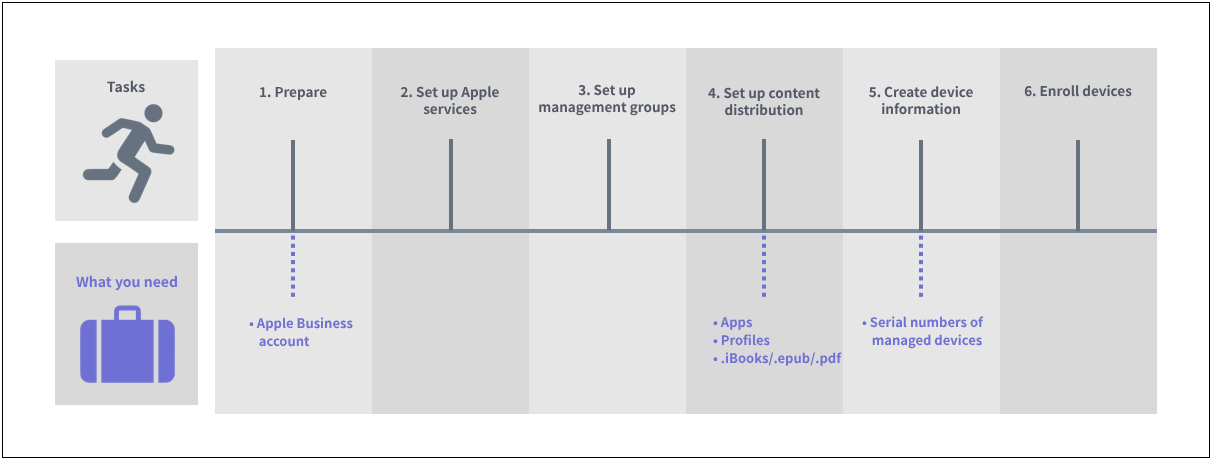
| Task and link to the manual | Where to work | Frequency | |||||
|---|---|---|---|---|---|---|---|
BizMobile Go! admin console | Apple site | Managed device | First time | Yearly | As needed | ||
| 1. Prepare |
| Yes |
| Yes |
|
| |
2. Set up Apple services | 2) Register the Apple Push certificate | Yes | Yes |
| Yes | Yes |
|
| 3) Enable ADE | Yes | Yes |
| Yes | Yes |
| |
| 4) Register an ADE profile | Yes | Yes |
| Yes *1 | |||
| 5) Enable VPP | Yes | Yes |
| Yes | Yes |
| |
| 3. Set up management groups | 6) Create a management group (Template) | Yes |
|
| Yes |
| Yes *1 |
| 4. Set up content distribution | 7) Purchase and register apps | Yes | Yes |
| Yes |
| Yes *1 |
| 8) Register an app (in-house) | Yes |
|
| Yes |
| Yes *1 | |
| 9) Register a profile | Yes |
|
| Yes |
| Yes *1 | |
| 10) Register a book (.ibooks/.epub/.pdf) | Yes |
|
| Yes |
| Yes *1 | |
| 5. Create device information | 11) Register devices in Apple Business | Yes | Yes |
|
|
| Yes *2 |
| 12) Import ADE devices from Apple Business into BizMobile Go! |
| Yes |
| Yes |
| Yes *2 | |
| 13) Create management information for the devices to register and link it to ADE devices | Yes |
|
| Yes |
| Yes *2 | |
| 6. Enroll devices | 14) Enroll the device |
|
| Yes | Yes |
| Yes *2 |
\*1 When a management group is added or changed
*2 When a device is added