Application Catalog
Application Catalog consists of two features: one lets you create a list of permitted or recommended apps that device users can install freely, and the other lets you download the created app list to devices so that device users can download (install) apps at any time.
The Application Catalog (app list) you create is used on the device through the dedicated BizGo! Catalog app.
You can also group apps by purpose using the category feature.
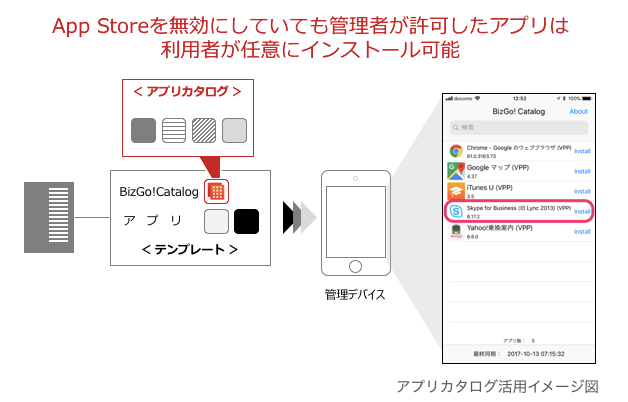
In BizMobile Go!, you create a template (management group) for each organization, assign the apps that the organization requires to the template, and distribute (install) them from the template to devices.
Note: Apps installed from a template are mandatory, and on supervised devices they are installed silently.
Application Catalog is a feature for cases where the apps needed differ from member to member within the same organization depending on job title or responsibilities. You define a list of permitted or recommended apps, and each member selects the apps they need from the app list and downloads (installs) them. You do not need to divide the templates (management groups) you created for each organization into smaller units, so you can manage apps more flexibly.
Apps that can be distributed using Application Catalog are VPP apps (Volume Purchase Program) and in-house developed In-house apps. An Apple ID is not required to download (install) apps.
To use the feature, register the BizGo! Catalog app in a template and distribute (install) it to devices, and also register the Application Catalog (app list) created for the same template. The BizGo! Catalog app on the device then lists the apps registered in the Application Catalog (app list). Device users can select any app from the list and download (install) it.
You can also set Install for each app registered in the Application Catalog to install the app automatically, for example when the device is enrolled. This saves you from having to install apps one by one during device setup. For how to configure this, see Create and edit an Application Catalog (app list).
This is an optional service. To use it, contact BIZMOBILE. For the steps required before you can use the service, see below.
The installation status of apps specified in the Application Catalog does not affect the device sync status.
If you edit the Application Catalog, such as by adding or removing apps, the change becomes subject to device sync management. The sync status of all devices registered in the template changes to Sync in progress.
Apps for which Install is set to Enabled are installed automatically on devices that belong to the template to which the Application Catalog is assigned. Unlike apps distributed from a template, they are not reinstalled automatically even if the device user deletes them.
Preparation
Create a list of apps (Application Catalog) that device users can install freely. You can also group apps by purpose using the category feature.
Assign the BizGo! Catalog app to a template and distribute it to devices so that it can be used.
Operation
This explains how device users select and install the apps they need.