Check Devices with Device Integrity Alarms
On the VIEW → Device Integrity Alarm screen, you can check devices that do not meet the specified integrity level.
For details on device integrity verification, see Device Integrity Verdict.
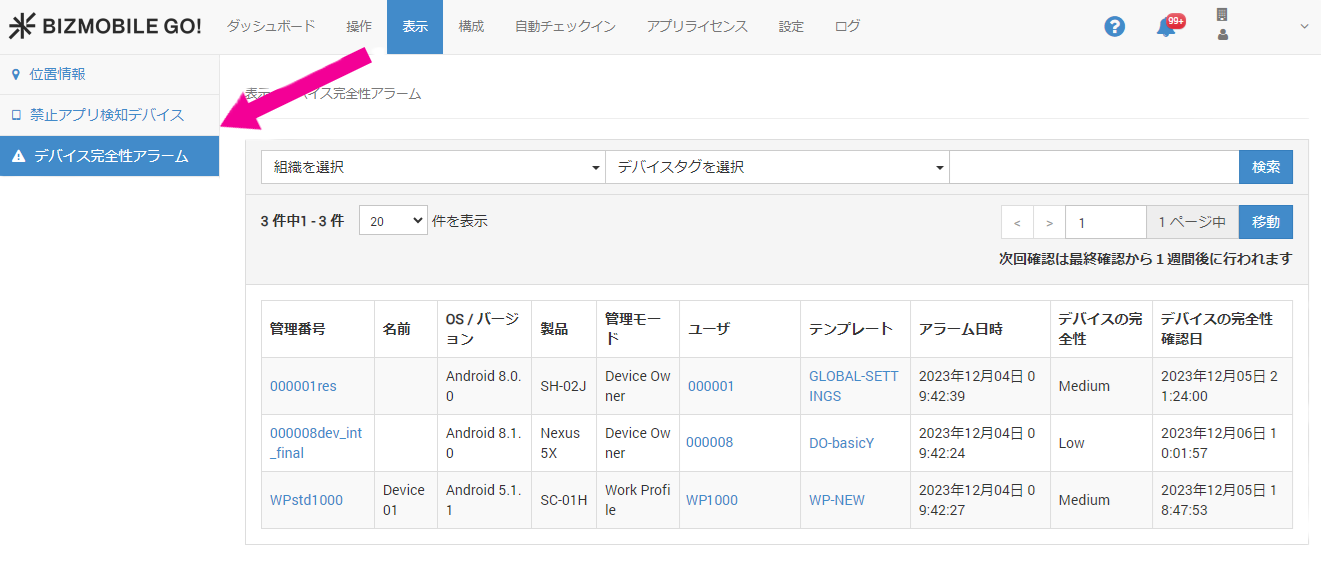
Items displayed
| Item | Description | Sort | Search |
|---|---|---|---|
| Identifier | Click to display the device detail screen | Sort | Search |
| Name | Displays the name from the basic device information | Sort | Search |
| OS/Version | Displays the OS version | Sort | Search |
| Product | Displays the product name | Sort | Search |
| Management Mode | Displays the management mode of the device | ||
| User | Click to display the user detail screen | Sort | Search |
| Template | Click to display the template detail screen | Sort | Search |
| Alarm Date and Time | Displays the date and time when the device integrity alarm was detected | ||
| Device Integrity | Displays the device integrity verification result | Sort | |
| Device Integrity Check Date | Displays the date and time when the device integrity verification result was last checked |