ADE (formerly DEP)
▶︎Related video (ADE device enrollment operation)
What Is ADE?
DEP has been renamed ADE (Automated Device Enrollment).
BizMobile Go! uses Apple's Automated Device Enrollment (ADE) to automate the deployment and MDM enrollment of iOS and macOS devices.
To use this feature, you must register an account with Apple Business (formerly Apple Business Manager).
For details about account registration and Apple Business, see the following Apple website.
https://support.apple.com/en-us/guide/apple-business-manager/asm6a88f692e/1/web/1
Note: The URL is as of April 6, 2023. The URL and the content of the website may be changed by the website operator without notice.
Devices that can be deployed and enrolled in MDM automatically with ADE are iPhone/iPad devices running iOS 7 or later and Mac computers running macOS 10.9 or later.
What You Can Do with ADE (Automated Device Enrollment)
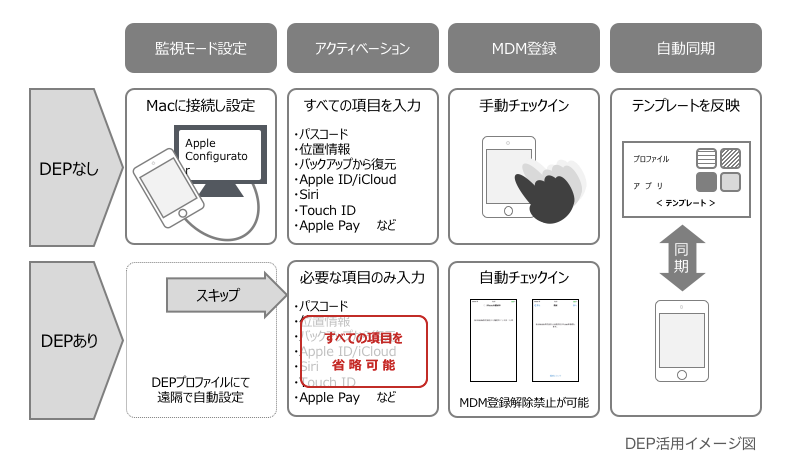
When you set up a factory-default iPhone/iPad by following the instructions on the device screen (activation), you can automatically apply the supervised setting and enroll the device in MDM management. An administrator can configure these steps without touching the device. You can also skip specific Setup Assistant screens during activation, which further simplifies the initial setup.
Even when a device needs to be re-enrolled because of a malfunction or similar reason, the device automatically returns to MDM management (re-enrollment) simply by erasing and activating it again, which minimizes the burden on administrators.
The same behavior also applies when a device is lost or stolen and forcibly erased, so it also serves as a safeguard for emergencies.
Supervised mode is the best method for managing company-issued devices, because it enables broad and detailed device management. For the differences depending on whether the supervised setting is applied, see About Supervised Mode.
- Enroll automatically in BizMobile Go! (MDM) (simplifies the enrollment procedure)
- Set devices to Supervised mode (broad and detailed device management)
- Prepare for loss and theft
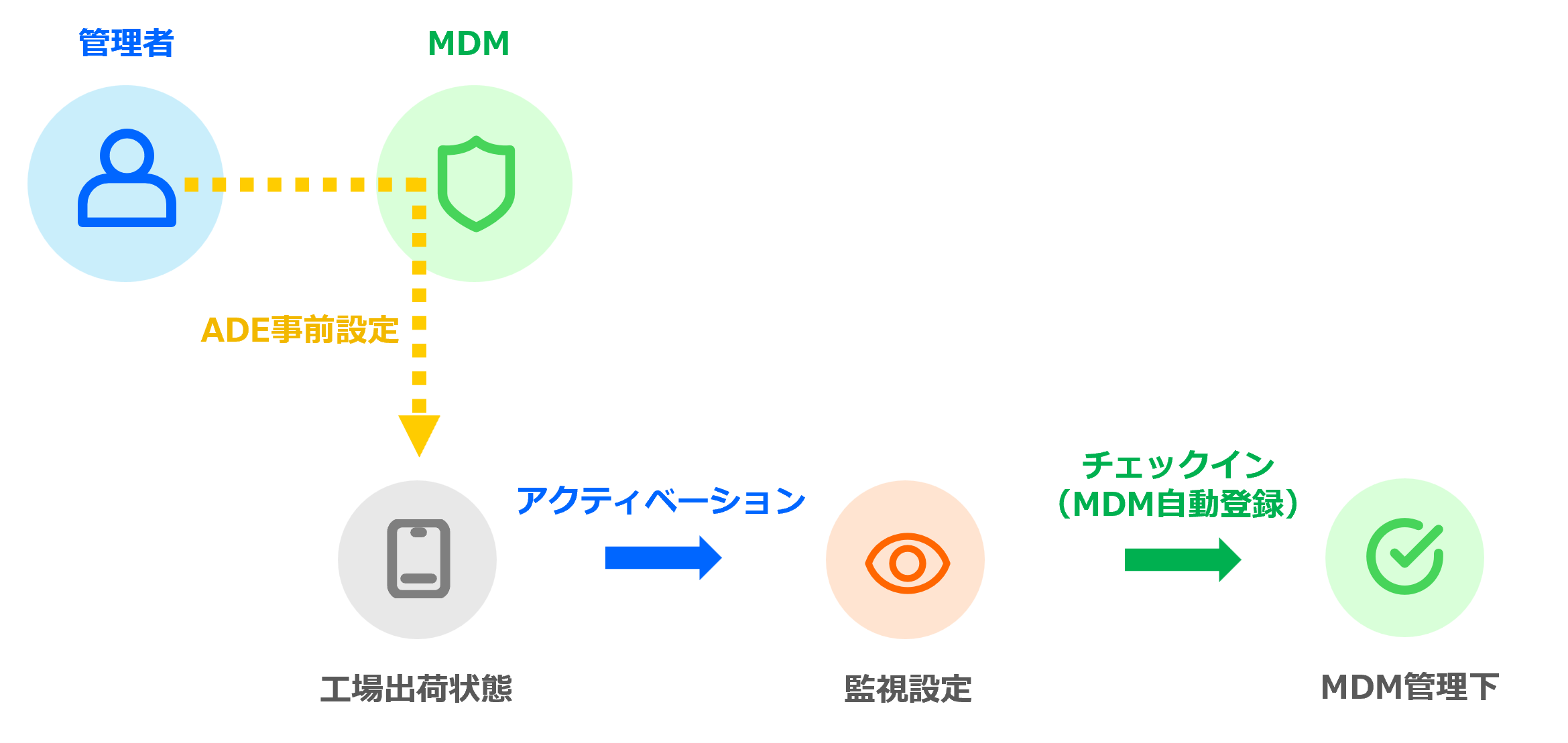
Devices that can use ADE are iPhone/iPad devices running iOS 7 or later and Mac computers running macOS 10.9 or later.
When You Do Not Use ADE
If you enroll devices in MDM without ADE, you must also enroll the device in MDM from the device after activation. If a device needs to be re-enrolled because of a malfunction or similar reason, the device information cannot be reused and must be created again.
For the enrollment method, see the Deployment Flow that does not use ADE.
If you cannot use ADE, set devices to Supervised using a Mac or an iPhone on which the Apple Configurator app is installed. See Set Devices to Supervised Without ADE.
From ADE Setup to Managing Devices
-
Enable ADE (formerly DEP) This is the first procedure to make ADE available in BizMobile Go! after you have registered an account with Apple Business.
-
Register an ADE (formerly DEP) Profile Create the basic ADE profile that is first applied to a device during device activation (enrollment in BizMobile Go!).
It also includes settings that let you omit some operations on the device during activation, so that you can set up devices (kitting) efficiently. -
Register Devices in Apple Business (Make Them ADE (formerly DEP) Devices) If the carrier (telecommunications provider) or reseller you purchased from has not registered the devices in Apple Business as ADE devices in advance, use this procedure to register the devices in Apple Business with Apple Configurator.
-
Import ADE (formerly DEP) Devices from Apple Business into BizMobile Go! Import the
serial numbersof the ADE devices registered in Apple Business so that they can be managed in BizMobile Go!. -
Create Device Information and Associate It with ADE (formerly DEP) Devices Create device information in BizMobile Go! and associate it with the ADE devices imported from Apple Business so that they can be enrolled.
-
Enroll ADE (formerly DEP) Devices Enroll ADE devices to start device management in BizMobile Go!.
Annual Renewal After You Start Managing Devices
- Renew the Apple ADE (formerly DEP) Token This is the annual renewal procedure for the Apple ADE token that you set up in the procedure for enabling ADE.