(Android) Configure BizGo! Air location and notification settings with a profile
Use a profile to configure the "location settings" and "notification settings" that are required to use BizGo! Air.
When you apply this setting, the permissions of the BizGo! Air app are set as follows.
•Location: "Allow all the time" is forced to "ON", and the device user cannot change it.
•Notifications: Set to "ON", but the device user can change it.
(Even if the user changes it, synchronization automatically sets it back to "ON".)
Location can be forced to "Granted" only in Device Owner mode. It cannot be set in a Work Profile. For details, see "Differences between Device Owner mode and Work Profile".
Configurable permissions and supported Android versions
The three permissions handled by this setting were all introduced as "runtime permissions (dynamic permissions)". Because each was introduced at a different time, the Android versions on which the setting takes effect also differ.
| Permission | Supported Android version | Background |
|---|---|---|
| ACCESS_FINE_LOCATION (precise location) | Android 6.0 (API 23) or later | The version in which the API for managing permissions (setPermissionGrantState) was introduced. |
| ACCESS_BACKGROUND_LOCATION (location in the background) | Android 10 (API 29) or later | The version in which location in the background was added as an independent permission. |
| POST_NOTIFICATIONS (notifications) | Android 13 (API 33) or later | The version in which notifications became a runtime permission and explicit permission is required. |
Notes on configuration
- This setting cannot be used on versions earlier than Android 6.0 (API 23)
This is because the API that lets a device owner set permissions (setPermissionGrantState) was itself implemented in Android 6.0. - Grant the two location permissions as a set
To fully allow location in the background on Android 10 or later, you must set both ACCESS_FINE_LOCATION (or ACCESS_COARSE_LOCATION) and ACCESS_BACKGROUND_LOCATION to "Granted". - Notification control works only on Android 13 or later
On Android 12 (API 32) and earlier, the notification permission is not subject to runtime control and was granted automatically when the app was installed. For this reason, the POST_NOTIFICATIONS setting is needed and effective only on Android 13 or later.
Differences between Device Owner mode and Work Profile
Starting with Android 12, an administrator cannot set sensor-related permissions to "Granted" in a Work Profile. Location is included in these sensor-related permissions, so the location settings on this page are effective only in Device Owner mode.
| Permission | Device Owner mode | Work Profile |
|---|---|---|
| ACCESS_FINE_LOCATION ACCESS_BACKGROUND_LOCATION (location) | Can be set to "Granted", and the device user cannot change it | Cannot be set to "Granted" ("Denied" can be set) |
| POST_NOTIFICATIONS (notifications) | Can be set | Can be set |
If you want to configure only the notification permission, also see "App Notification Permission Settings".
In a Work Profile, whether to grant the location permission is left to the device user. The administrator can only set "Denied".
For a device upgraded from Android 11 to Android 12, permissions that have already been granted remain as they are, but new permissions cannot be granted.
For details, see the official Android documentation "What's new in Android 12 for enterprise".
Setup procedure
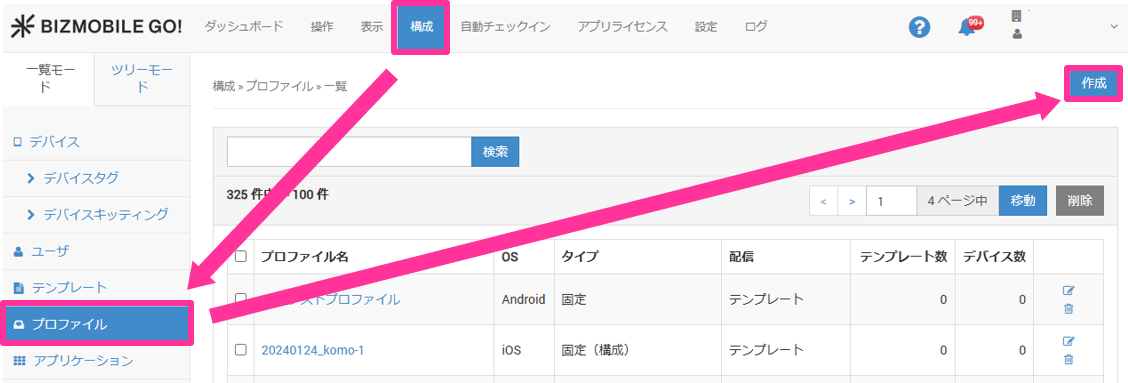
- Select CONFIG → Profile and click Create.
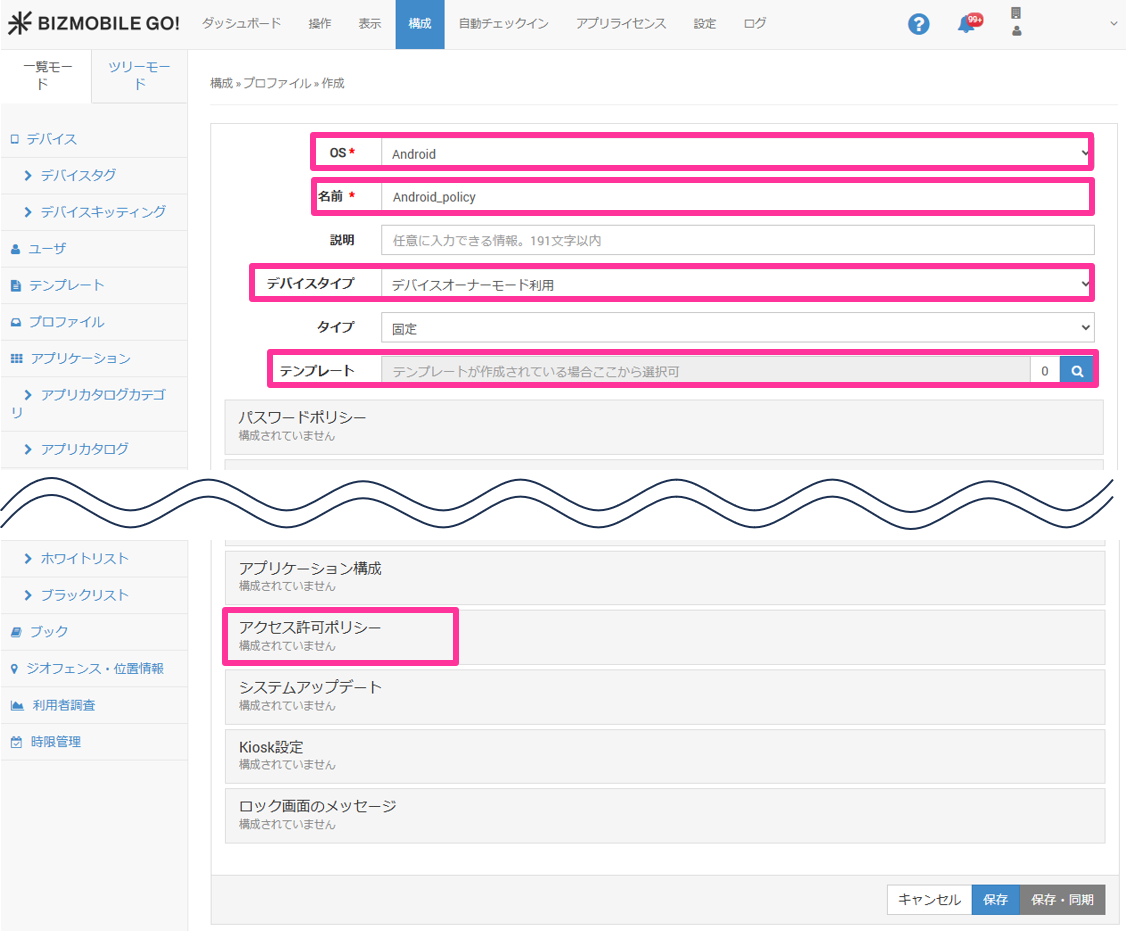
- Select "Android" for "OS", specify "Name", "Device Type", and "Template", and then click "Permission Request Policy".
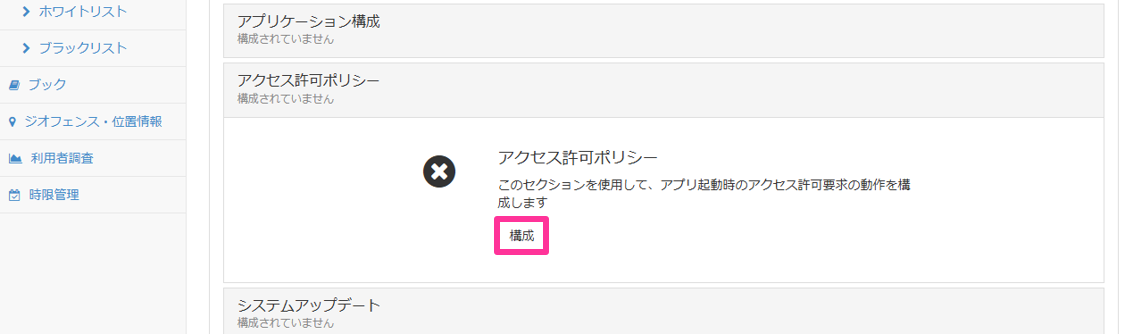
- Click "Configure".
- Click "Add Per App Runtime Permission Policy".
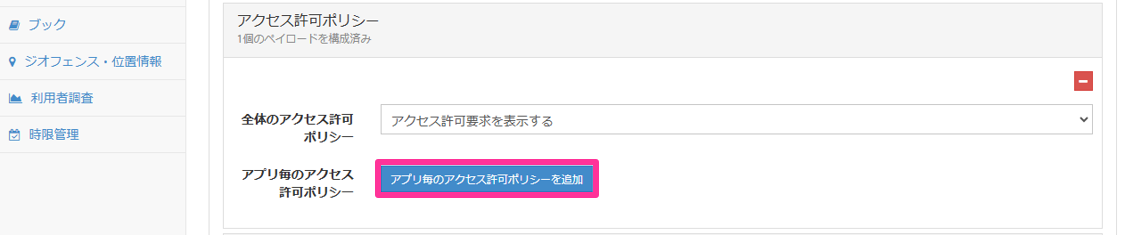
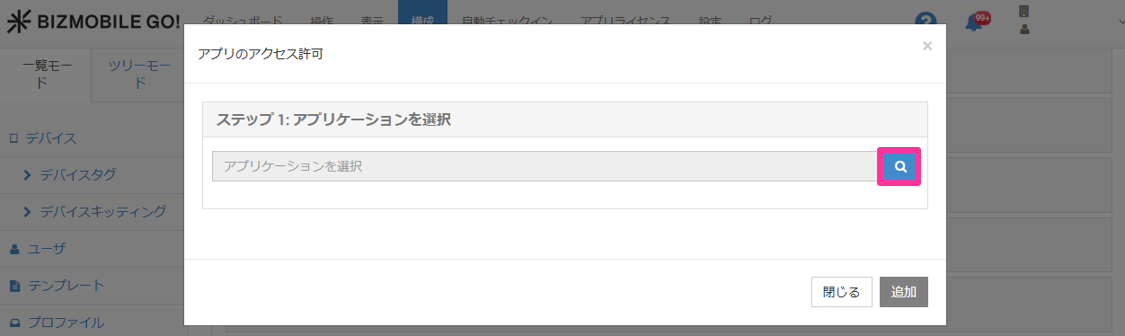
- Click the magnifying glass icon for "Select Application".
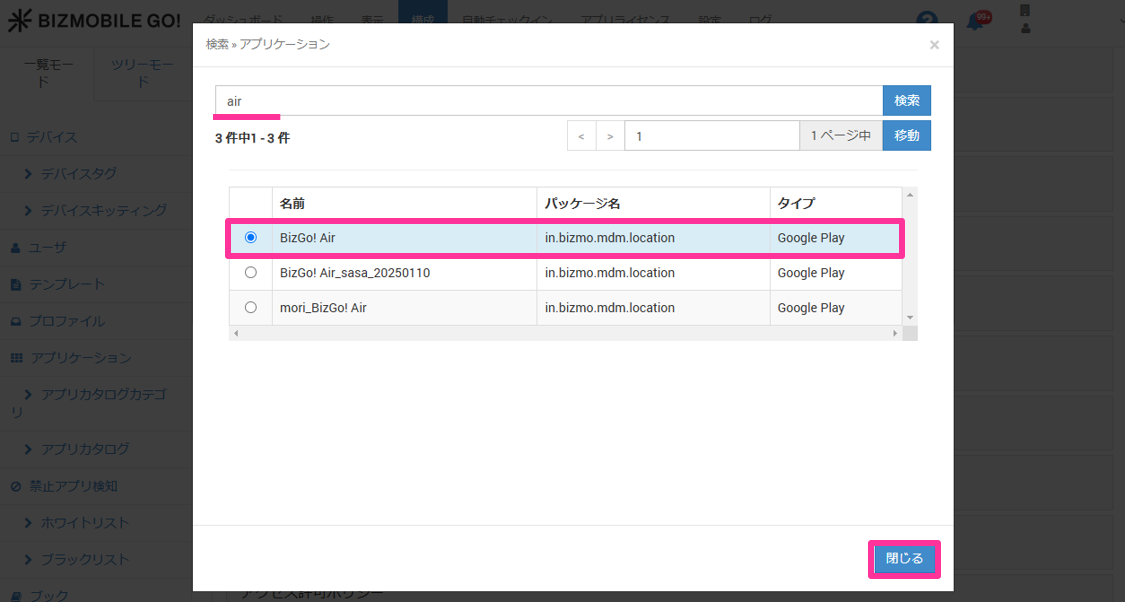
- Search for the app, select "BizGo! Air", and then click "Close".
- Click "Add Runtime Permission".
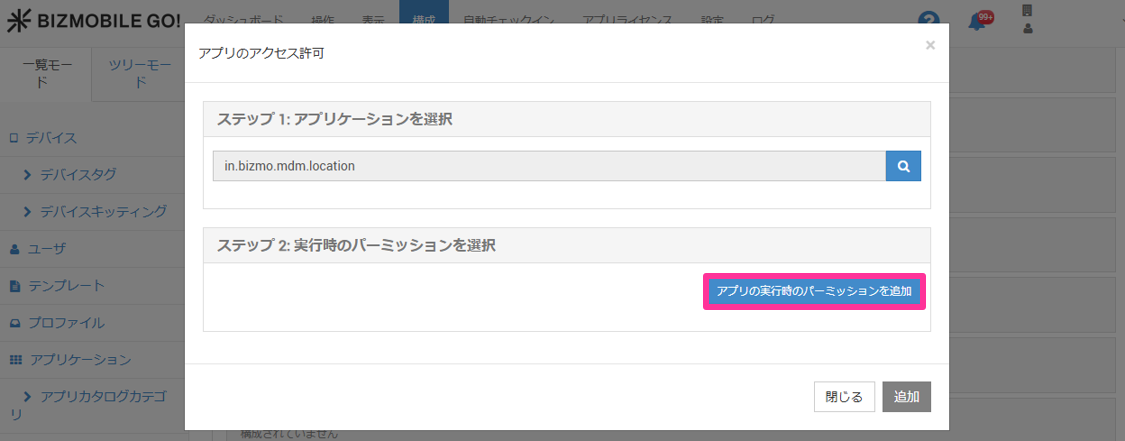
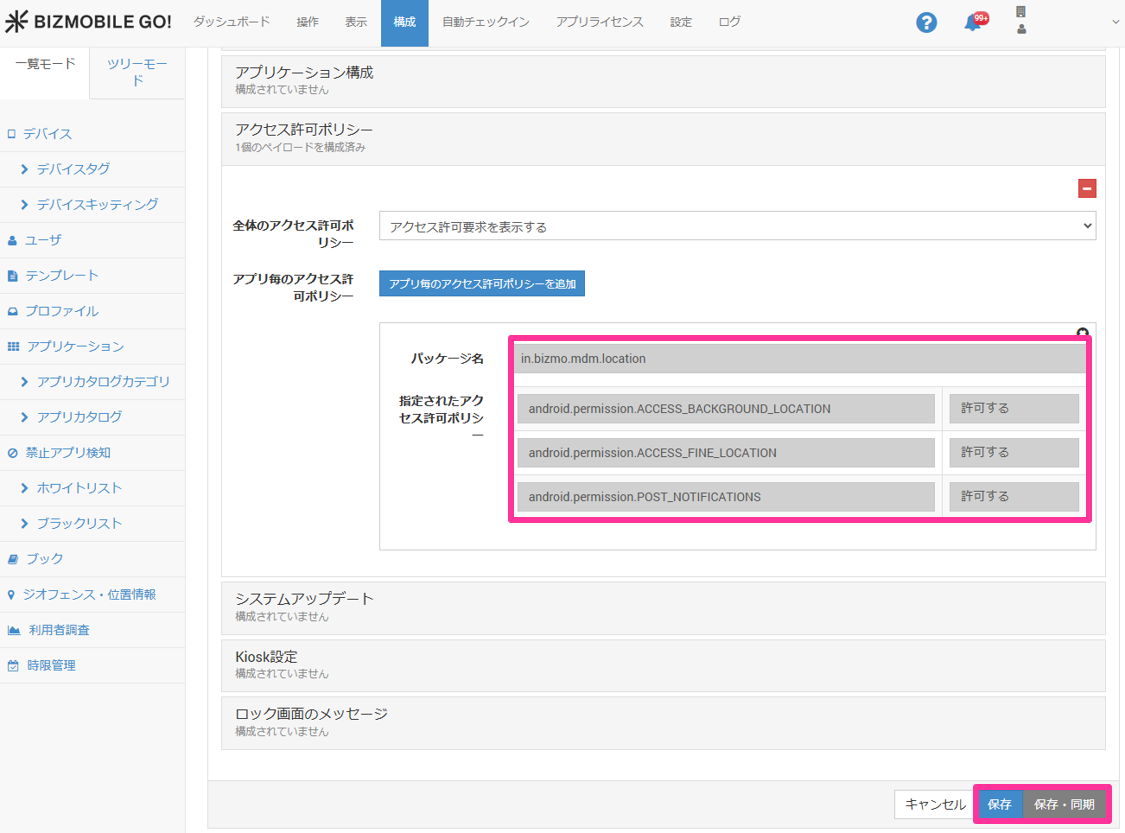
- Click "Add Runtime Permission", set the following three items to "Granted", and then click "Add".
•android.permission.ACCESS_BACKGROUND_LOCATION - (location in the background / Android 10 or later)
•android.permission.ACCESS_FINE_LOCATION - (precise location / Android 6.0 or later)
•android.permission.POST_NOTIFICATIONS - (notifications / Android 13 or later)
Note: To allow location in the background as well, set both of the two location permissions above to "Granted". For details, see "Configurable permissions and supported Android versions".
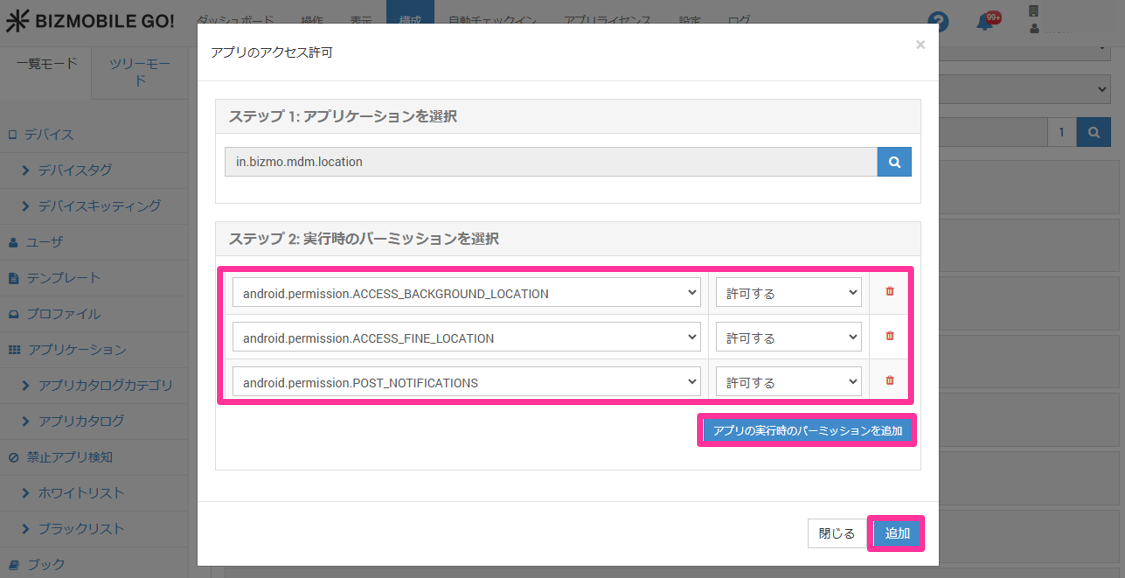
- Confirm that all required permissions are set to "Granted", and then click "Save" or "Save & Sync".