Distribute Certificates to Specified Devices Using a CSV File
You can use a CSV file to specify target devices and distribute one or more certificates to them.
- Compress the certificates to distribute into a ZIP file. Compress the certificate files directly, without creating a folder.
- Create a CSV file that contains the distribution information. Use the following columns, depending on the purpose.
Wi-Fi (iOS, Windows)
device_identifier | Device identifier |
wifi[N].certfile | Certificate file name |
wifi[N].certpass | Certificate password |
device_identifier,wifi[0].certfile,wifi[0].certpass
device01,user1.p12,1111
device02,user2.p12,1111
device03,user3.p12,1111
[N] starts from 0 (zero). To specify multiple certificates, continue with [1], [2], [3], and so on.
VPN (iOS, Windows)
device_identifier | Device identifier |
vpn[N].certfile | Certificate file name |
vpn[N].certpass | Certificate password |
device_identifier,vpn[0].certfile,vpn[0].certpass
device01,user1.p12,1111
device02,user2.p12,1111
device03,user3.p12,1111
[N] starts from 0 (zero). To specify multiple certificates, continue with [1], [2], [3], and so on.
Exchange (iOS, Windows)
device_identifier | Device identifier |
exchange[N].certfile | Certificate file name |
exchange[N].certpass | Certificate password |
device_identifier,exchange[0].certfile,exchange[0].certpass
device01,user1.p12,1111
device02,user2.p12,1111
device03,user3.p12,1111
[N] starts from 0 (zero). To specify multiple certificates, continue with [1], [2], [3], and so on.
Distribute certificates only (iOS, Windows, Android)
device_identifier | Device identifier |
cert[N].certfile | Certificate file name |
cert[N].certpass | Certificate password |
device_identifier,cert[0].certfile,cert[0].certpass
device01,user1.p12,1111
device02,user2.p12,1111
device03,user3.p12,1111
[N] starts from 0 (zero). To specify multiple certificates, continue with [1], [2], [3], and so on.
- Enter the required information on the profile creation screen.
Input fields (★ indicates a required field)
OS★ | Select the target OS. |
Distribution | Select Profiles are normally distributed through templates. For a profile that you want to distribute on a per-device basis, select |
Type | Select |
Template | (Only when you selected Select the template to which this profile is applied. After you create a template, you can select it here. If you have not created a template yet, leave this field blank (you can also select the profile from the template screen when you create the template). |
Device | (Only when you selected Select the device to which this profile is applied. After you create a device, you can select it here. If you have not created a device yet, leave this field blank (you can also select the profile from the device screen after you create the device). |
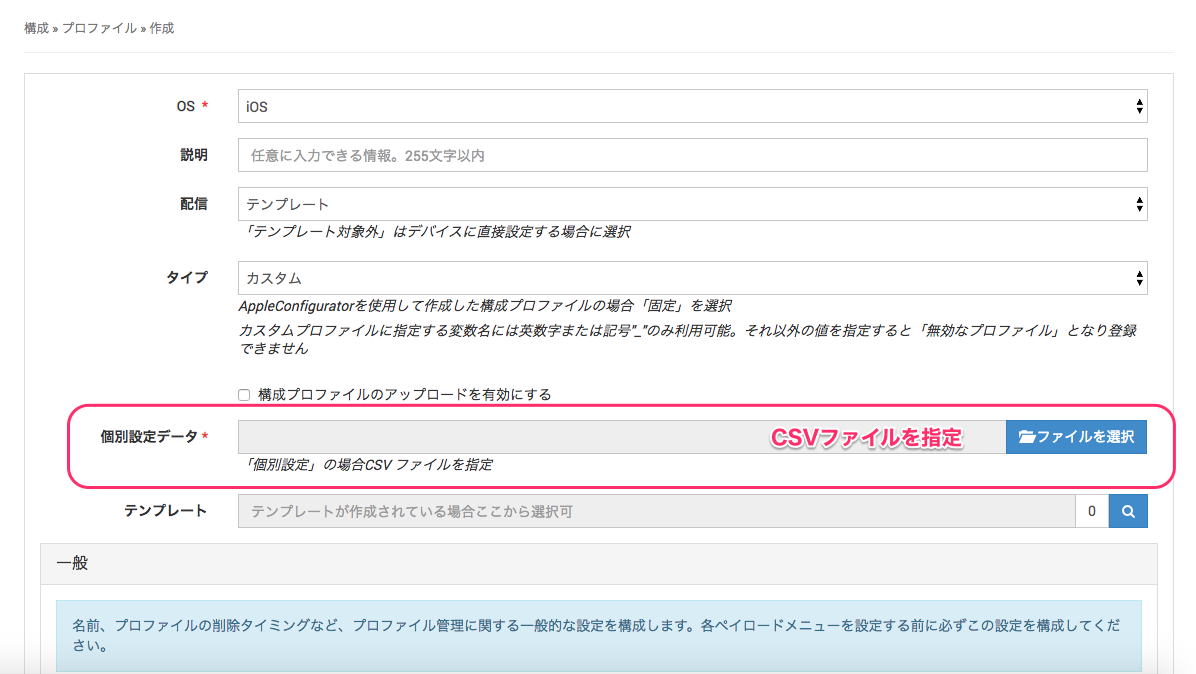
- Specify the CSV file you created in step 2 in
Individual Settings Dataon the profile creation screen.
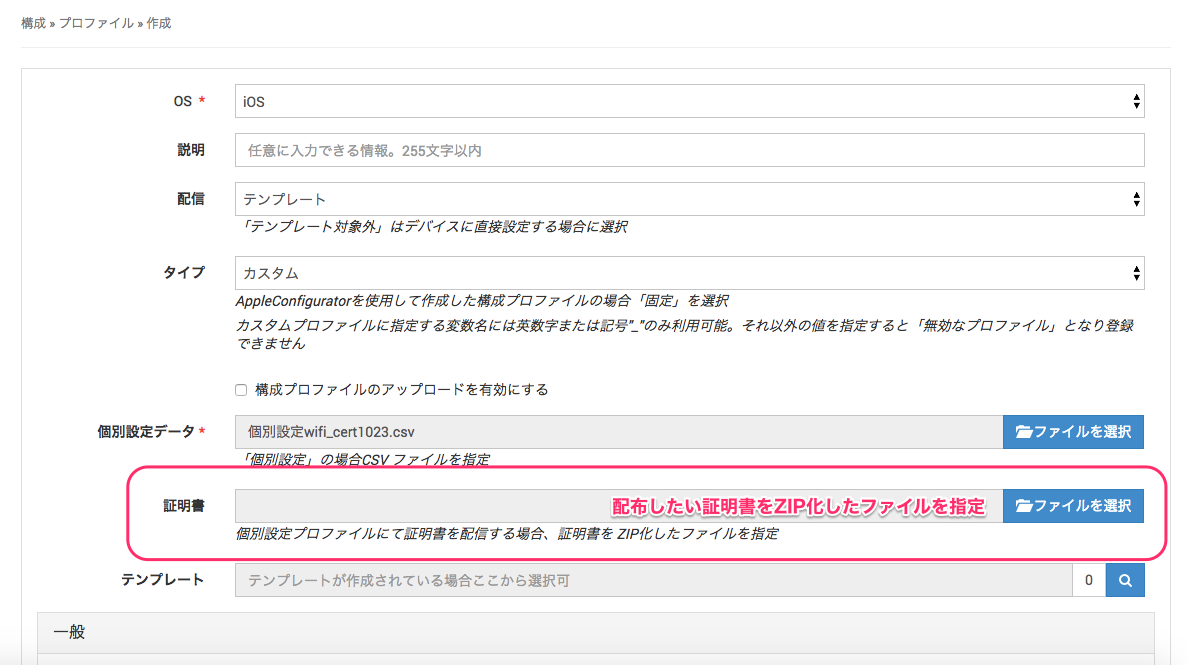
- After you specify the CSV file in step 4,
Certificateappears belowIndividual Settings Data. Specify the certificate ZIP file you created in step 1 inCertificate.
- To save your entries, click [Save].