(iOS) Profile Setting Types and Details
This page describes the restriction items that can be configured in an iOS profile, and lists the settings that can be distributed together with a profile to managed devices, along with their details.
For the supported OS version of each feature and whether the device must be Supervised, see the tables below.
Passcode
| Item | Default | Details |
|---|---|---|
Allow simple value | On | Allows repeated characters and ascending or descending sequences. |
Require alphanumeric value | If turned on, the passcode must contain at least one letter and at least one number. | |
Minimum password length | Specifies the minimum password length. (1 to 16) | |
Minimum number of complex characters | Specifies the minimum number of non-alphanumeric characters that the passcode must contain. (1 to 4) | |
Password expiration (1 to 730 days, or none) | The expiration period used to force periodic password changes. Specify the number of days as a number from 1 to 730. | |
Maximum Auto-Lock | Specifies the maximum time until auto-lock.
| |
Passcode history (1 to 50 passcodes, or none) | Specifies, as a value from 1 to 50, the number of passcode changes required before a previously used passcode can be reused. | |
Maximum grace period for device lock | Specifies the available time until the device locks.
| |
Maximum number of failed attempts | Specifies the number of times a wrong passcode can be entered. (2 to 10) |
Restrictions (Features)
| Restriction | Default | Description | Target Version | Supervised |
|---|---|---|---|---|
Allow use of camera
| On | Disables the camera and removes the | ||
Allow FaceTime | On | Prevents users from making or receiving FaceTime audio or video calls. |
| Required |
Allowed camera restriction bundle IDs | On | Specifies, in a list, the apps that are allowed to use the camera as an exception when the camera feature is set to "restricted". | iOS 26.0 or later | Required |
Allow screenshots and screen recording | On | Prevents users from saving screenshots or screen recordings. | iOS 9.0 or later | |
Allow AirPlay, viewing the screen by "Classroom", and screen sharing | On | Prevents teachers using | iOS 11/macOS 10.14.4 or later | Required |
Allow "Classroom" to perform AirPlay and "View Screen" without prompting | Prevents students from receiving a notification when a teacher uses AirPlay or screen viewing on a student's iPad in a managed class. | iOS 11.0 or later | Required | |
Allow AirDrop | On | Prevents users from using AirDrop. | iOS 7 or later | Required |
Allow iMessage | On | Hides the | iOS 6 or later | Required |
Allow Apple Music | On | Prevents users from using Apple Music. The Music app runs in classic mode. | iOS 9.3 or later | Required |
Allow Radio | On | Prevents users from listening to radio in Apple Music. | iOS 9.3 or later | Required |
Allow voice dialing while device is locked | On | Prevents users from making phone calls by using voice control while the managed device is locked. | ||
Allow Siri | On | Prevents Siri from being used. | ||
Allow Siri while device is locked | On | Siri responds only while the managed device is unlocked. If no passcode is set on the managed device, this restriction is ignored. | iOS 5.1 or later | |
Enable Siri profanity filter | Prevents the Siri profanity filter from being used. | iOS 5 or later | Required | |
Show user-generated content in Siri | On | Prevents Siri from accessing content from sources that allow user-generated content (such as Wikipedia). | iOS 7 or later | Required |
Allow Siri Suggestions | On | Prevents Siri from offering suggestions such as apps, people, and places while searching. | ||
Allow Apple Books | On | Disables Apple Books and prevents users from using Apple Books from the | iOS 6 or later | Required |
Allow installing apps
| On | Disables the App Store and removes its icon from the Home Screen. Prevents users from installing and updating apps from the App Store by using Finder (macOS 10.15 or later) or iTunes (macOS 10.14 or earlier). | No (iOS 12.4 or earlier) Yes (iOS 13 or later) | Required |
Allow installing apps from the Store | On | Hides the App Store icon and prevents it from being used. Host applications (iTunes, Configurator) can still be used to install or update apps. | iOS 9.0 or later | Required |
Allow automatic app downloads | On | Prevents applications purchased on other devices from being downloaded automatically. | iOS 9.0 or later | Required |
Allow deleting apps | On | Prevents users from deleting installed applications. | iOS 4.2.1 or later | Required |
| Allow deleting system apps | On | Prevents users from deleting built-in applications made by Apple. | iOS 11.0 or later | Required |
Allow App Clips | On | Prevents users from adding App Clips. When this restriction is applied, existing App Clips are removed. | iOS 14.0 or later | Required |
Allow in-app purchases | On | Prevents users from making in-app purchases. | ||
Require iTunes Store password for all purchases | Prevents users from being asked to enter the account password for in-app purchases and iTunes purchases. | iOS 5.0 or later | ||
Allow iCloud backup | On | Prevents the managed device from being backed up by anything other than iTunes. | iOS 5.0 or later | |
Allow iCloud documents and data | On | Prevents documents and data from being stored in iCloud. | Yes (iOS 13 or later) | Required |
Allow iCloud Keychain | On | Prevents iCloud Keychain from being used. | iOS 7.0 or later | |
Allow managed apps to store data in iCloud | On | Prevents users from storing data of managed apps in iCloud. | ||
Allow backup of enterprise books | On | Prevents users from backing up books distributed by the organization to iCloud or iTunes. | ||
| Allow sync of enterprise book notes and highlights | On | Prevents users from syncing notes and highlights to other devices by using iCloud. | ||
Allow Shared Albums | On | Prevents users from subscribing to or publishing shared photo albums. | iOS 6.0 or later | |
Allow iCloud Photos | On | Prevents users from using iCloud Photo Library. | iOS 9.0 or later | |
Allow "My Photo Stream" (data may be lost if not allowed) | On | Photos in Important: These photos and videos may be lost if no other copies exist. | iOS 5.0 or later | |
Allow automatic sync while roaming | On | While roaming, the device syncs only when the user accesses an account. | ||
| Allow access to USB drives in the "Files" app | On | Prevents the Files app from accessing USB devices connected to the device. | iOS 13 or later | Required |
| Allow access to network drives in the "Files" app | On | Prevents the | iOS 13 or later | Required |
Force encrypted backups | Prevents users from choosing whether device backups created with iTunes are stored in encrypted form on the user's Mac. If the profile is encrypted and this option is off, backup encryption is mandatory and is enforced by iTunes. Profiles installed on a device by Profile Manager are never encrypted. | |||
Allow apps to request to track | On | Prevents users from turning on Allow Apps to Request to Track. | iOS 14.0 or later | |
Allow Apple personalized advertising | On | Prevents Apple's advertising platform from using user data to deliver personalized ads. | iOS 14.0 or later | |
Allow "Erase All Content and Settings" | On | Prevents users from using | iOS 8 or later | Required |
Allow users to accept untrusted TLS certificates | On | Users are not asked whether to trust certificates that cannot be verified. This setting applies to Safari, Mail, Contacts, and Calendar accounts. If you turn this option on, only certificates that chain to a trusted root certificate are accepted, and no message is displayed. | iOS 5.0 or later | |
Allow automatic updates to certificate trust settings | On | Prevents automatic updates to certificate trust settings. | iOS 7.0 or later | |
Allow trusting new enterprise app authors | On | Prevents users from trusting new enterprise app authors, so users cannot launch apps from those authors. | iOS 9.0 or later | |
Allow installing configuration profiles | On | Prevents users from installing configuration profiles manually. | iOS 6 or later | Required |
Allow adding VPN configurations | On | Prevents users from creating or adding VPN configurations. | iOS 11 or later | Required |
| Force automatic date and time | Turns on Set Automatically for date and time, and prevents users from turning off Set Automatically. | iOS 12.0/tvOS 12.2 or later | Required | |
Allow "Classroom" to lock apps and devices without prompting | Teachers can lock an app open or lock a device without first prompting the user. | iOS 11/macOS 10.14.4 or later | Required | |
Automatically join "Classroom" classes without prompting | Students can join a class without prompting the teacher. | iOS 11/macOS 10.14.4 or later | Required | |
| Require teacher permission to leave unmanaged "Classroom" classes | Students must request permission before leaving an unmanaged (teacher-created) class. | iOS 11.3/macOS 10.14.4 or later | Required | |
| Force Wi-Fi power on | Forces Wi-Fi to be powered on. | iOS 13 or later | Required | |
Allow NFC | On | Prevents users from using near field communication. | iOS 14.2 or later | |
Allow modifying account settings | On | Prevents users from creating new accounts or changing settings associated with accounts, such as user names and passwords. | iOS 7.0 or later | Required |
Allow modifying Bluetooth settings | On | Prevents users from changing Bluetooth settings. | iOS 11 or later | Required |
Allow modifying cellular data app settings | On | Prevents users from changing the settings of apps that use cellular data. | iOS 7 or later | Required |
Allow modifying cellular plan settings | On | Prevents users from changing cellular plan settings. | iOS 11 or later | Required |
| Allow modifying eSIM settings | On | Prevents users from adding or removing eSIM plans on iPhones that support eSIM. | iOS 12.1 or later | Required |
Allow modifying device name | On | Prevents users from changing the device name shown in | iOS 9.0/tvOS 11 or later | Required |
Allow modifying notification settings | On | Prevents users from changing notification settings. | iOS 9.3 or later | Required |
Allow modifying passcode | On | Prevents users from changing the passcode that has been set. | iOS 9.0 or later | Required |
Allow modifying Touch ID fingerprint / Face ID face data | On | Prevents users from adding Touch ID/Face ID data or deleting existing data. | iOS 8.3 or later (Touch ID) iOS 11.0 or later (Face ID) | Required |
Allow Screen Time
| On | Prevents users from setting their own restrictions or Screen Time on the managed device. | iOS 8.0 or later (Restrictions) iOS 12.0 or later (Screen Time) | Required |
Allow modifying wallpaper | On | Prevents users from changing the Lock Screen or Home Screen wallpaper. | iOS 9.0 or later | Required |
| Allow modifying Personal Hotspot settings | On | Prevents users from changing Personal Hotspot settings. | iOS 12.2 or later | Required |
Allow "Find My Friends" | On | Prevents users from turning on the features of the | iOS 13 or later | Required |
| Allow "Find My Device" in "Find My" | On | Prevents users from turning on the features of the Find My Device app. | iOS 13.0 or later | Required |
| Allow modifying "Find My Friends" settings | On | Prevents users from changing or updating the settings of the Find My Friends app. | iOS 13.0 or later | Required |
| Allow USB accessories while device is locked | Users can allow USB accessories to always access the iOS device. | iOS 11.4.1 or later | Required | |
Allow pairing with non-Configurator hosts
| On | Prevents users from pairing an iOS device with any device other than the Mac with Apple Configurator installed that first supervised the device. If no supervision host certificate is set, all pairing is disabled. | iOS 5 or later | Required |
| Allow unpaired devices to enter Recovery Mode | Prevents users from putting an unpaired device into Recovery Mode. | iOS 14.5 or later | Required | |
Allow documents from managed sources in unmanaged destinations | On | Prevents data of apps distributed by MDM from being accessed by other apps. | iOS 7.0 or later | |
Allow documents from unmanaged sources in managed destinations | On | Prevents apps distributed by MDM from accessing data of other apps. | iOS 7.0 or later | |
Include copy and paste in restrictions | Includes copy & paste in the control of the following items.
| iOS 15.0 or later | ||
Treat AirDrop as an unmanaged destination | AirDrop from managed apps is no longer shown to users as an option. To turn this restriction on and enable it, you must also turn off | iOS 9.0 or later | ||
Allow Handoff | On | Prevents users from using Handoff on their Apple devices. | ||
Allow sending diagnostic and usage data to Apple | On | Prevents diagnostic information from being sent to Apple. | iOS 6.0 or later | |
Allow modifying diagnostics settings | On | Prevents changes to the diagnostic data settings. | iOS 9.3.2 or later | Required |
Allow unlocking the device with Touch ID/Face ID | On | Prevents the managed device from being unlocked with Touch ID. | iOS 7.0 or later | |
| Allow password AutoFill | On | Password AutoFill cannot be used, and users are not asked whether to retrieve saved passwords from iCloud Keychain or third-party password managers. | iOS 12.0 or later | Required |
| Require Touch ID/Face ID authentication before AutoFill | Users are asked to authenticate when they try to AutoFill password or credit card information in Safari or applications. If this restriction is not set, users can toggle this feature in Settings. Supported only on devices that support Face ID. | iOS 11 or later | Required | |
| Allow unlocking with Apple Watch | On | Prevents users from unlocking the device with Apple Watch. | iOS 14.5 or later watchOS 11.0 or later | |
Force Apple Watch wrist detection | Apple Watch locks automatically when it is removed from the user's wrist. It can be unlocked by using the passcode or the paired iPhone. | iOS 8.2 or later | ||
Allow pairing with Apple Watch | On | Prevents users from pairing a supervised iPhone with an Apple Watch. | iOS 9.0 or later | Required |
Require passcode on first AirPlay pairing | A passcode is required the first time an iOS device or Apple TV is paired to use AirPlay. | iOS 7.1 or later | ||
Join only Wi-Fi networks installed by a Wi-Fi payload | Prevents the managed device from connecting to any Wi-Fi network other than those distributed by using the profile's | iOS 10.3 or later | Required | |
Allow setting up new nearby devices | On | Prevents users from using an Apple device to set up or configure other Apple devices. | iOS 11.0 or later | Required |
| Allow proximity-based password sharing requests | On | Prevents the user's device from exposing passwords to nearby devices by using AutoFill to Nearby Devices. On iOS and macOS, this feature restricts only Wi-Fi password requests. | iOS 12.0/tvOS 12.2 or later | Required |
| Allow password sharing | On | Prevents users from sharing passwords. | iOS 12.0 or later | Required |
Allow AirPrint | On | Prevents users from using AirPrint. | iOS 11 or later | Required |
Allow iBeacon discovery of AirPrint printers | On | Prevents users from discovering AirPrint printers by using nearby iBeacons. | iOS 11 or later | Required |
Allow storage of AirPrint credentials in Keychain | On | Prevents users from storing AirPrint credentials in Keychain. | iOS 11 or later | Required |
Disallow AirPrint to destinations with untrusted certificates | Prevents users from using AirPrint to print on printers with untrusted certificates. | iOS 11 or later | Required | |
Allow predictive keyboard | On | Prevents users from displaying the predictive keyboard. | iOS 8.1.3 or later | Required |
Allow keyboard shortcuts | On | Prevents users from using keyboard shortcuts. | iOS 9.0 or later | Required |
| Allow continuous path keyboard | On | Prevents users from using the continuous path (swipe) keyboard. | iOS 13.0 or later | Required |
Allow auto-correction | On | Prevents word correction suggestions from being shown to users. | iOS 8.1.3 or later | Required |
Allow spell check | On | Prevents possibly misspelled words from being underlined in red. | iOS 8.1.3 or later | Required |
Allow Define | On | Prevents users from double-tapping a word to look up its definition. | iOS 8.1.3 or later | Required |
Allow dictation | On | Prevents dictation from being used. | iOS 10.3 or later | Required |
Allow Wallet notifications on the Lock Screen | On | Users must unlock the managed device to use | iOS 6.0 or later | |
Show Control Center on the Lock Screen | On | Prevents users from showing Control Center by swiping up. | iOS 7.0 or later | |
Show Notification Center on the Lock Screen | On | Prevents users from receiving notifications while the screen is locked. | iOS 7.0 or later | |
Show Today view on the Lock Screen | On | Prevents users from showing Notification Center with Today view on the Lock Screen by swiping down. | iOS 7.0 or later | |
| Defer software updates: XX days | For the specified period, prevents users from manually updating the device over a wireless connection. When this restriction is applied, the deferral period defaults to 30 days, and you can change it to a value from 1 to 90 days. The deferral period starts counting down when an OS update is released. After the deferral period ends, users see a notification prompting them to update the OS. Note: On devices running iOS / iPadOS 18 or later, macOS 15 or later, or tvOS 18.4 or later, if the template has an equivalent setting in OS Update Management (DDM), the DDM setting takes precedence. | iOS 11.3/tvOS 12.2 or later | Required | |
| Allow installing Rapid Security Responses | On | If you turn this option off, users cannot update security software with Rapid Security Responses from the device. Note: On devices running iOS / iPadOS 18 or later, macOS 15 or later, or tvOS 18.4 or later, if the template has an equivalent setting in OS Update Management (DDM), the DDM setting takes precedence. | iOS 16.0 or later | |
| Allow removing Rapid Security Responses | On | If you turn this option off, users cannot remove installed Rapid Security Responses from the device. Note: On devices running iOS / iPadOS 18 or later, macOS 15 or later, or tvOS 18.4 or later, if the template has an equivalent setting in OS Update Management (DDM), the DDM setting takes precedence. | iOS 16.0 or later | |
| iPhone or iPad widgets on Mac | On | Prevents users from adding iPhone or iPad widgets to a Mac. | iOS 17.0 or later | |
| Allow Live Voicemail | On | Prevents users from using Live Voicemail. | iOS 17.2 or later | |
| Force eSIM to be preserved on erase | Prevents the eSIM from being erased when the number of failed passcode attempts exceeds the limit, or when the device is reset by using Erase All Content and Settings in the Settings app.Note: If device erase is initiated from Find My, the operating system does not preserve the eSIM. | iOS 17.2 or later | ||
| Allow installing apps from alternative marketplaces | On | Prevents installation of new alternative app marketplaces and of apps hosted on those marketplaces. | iOS 17.4 or later | Required |
| Allow automatic dimming | On | Prevents the tandem OLED display on the device from being dimmed. | iOS 17.4 or later | Required |
| Allow installing apps from websites | On | Prevents apps from being installed directly from the web. | iOS 17.5 or later | Required |
| Allow Image Wand | On | Prevents users from using Image Wand. | iOS 18 or later | Required |
| Allow personalized handwriting results | On | Related to Apple Intelligence Prevents iOS and iPadOS from generating text in the user's handwriting style. | iOS 18 or later | Required |
| Allow locking apps | On | Prevents users from locking apps. With this restriction, users also cannot hide apps. | iOS 18 or later | Required |
| Allow hiding apps | On | Prevents users from hiding apps. | iOS 18 or later | Required |
| Allow external transfer of eSIM | On | Prevents an eSIM from being transferred from the device on which the restriction is installed to another device. | iOS 18 or later | Required |
| Allow iPhone Mirroring | On | Prevents the iPhone from being mirrored to a Mac. | iOS 18 or later | Required |
| Allow Writing Tools | On | Related to Apple Intelligence Prevents the Apple Intelligence Writing Tools from being used. | iOS 18 or later | Required |
| Allow Image Playground | On | Related to Apple Intelligence Prevents users from using Image Playground. | iOS 18 or later | Required |
| Allow Genmoji | On | Related to Apple Intelligence Prevents users from creating Genmoji. | iOS 18 or later | Required |
| Allow call recording | On | Prevents call recording from being used on the iPhone. | iOS 18.1 or later | Required |
| Allow RCS messaging | On | Prevents RCS messaging from being used. | iOS 18.1 or later | Required |
| Allow Mail summarization | On | Related to Apple Intelligence Prevents email message summaries from being created manually. This does not affect automatic summary generation. | iOS 18.1 or later | Required |
| Allow satellite connectivity | On | Prevents the device from connecting to and using satellite services. | iOS 18.2 or later | Required |
| Allow sign-in to external intelligence integrations | On | Related to Apple Intelligence Forces external intelligence providers into anonymous mode. If a user is already signed in to an external intelligence provider, applying this restriction signs the user out. | iOS 18.2 or later | Required |
| Allow external intelligence workspace IDs | Off | If present, Apple Intelligence can use only the specified external intelligence workspace IDs, and sign-in is required to make requests. Users must sign in to an intelligence service that supports sign-in. This is an array of strings, but it is currently limited to one element. Multiple payloads are combined by an intersection operation, so if multiple payloads specify conflicting values, the set of allowed workspace IDs may become an empty set. | iOS 18.3 or later | Required |
| Allow Apple Intelligence reports | On | Prevents Apple Intelligence reports from being used. | iOS 18.4 or later | Required |
| Allow the "Notes" transcription summary feature | On | Prevents the "Notes" transcription summary feature from being used. | iOS 18.3 or later | Required |
| Allow the "Notes" transcription feature | On | Disables the "Notes" transcription feature. | iOS 18.4 or later | Required |
| Allow the "Mail" Smart Reply feature | On | Disables the "Mail" Smart Reply feature. | iOS 18.4 or later | Required |
| Allow the Visual Intelligence summary feature | On | Prevents the Visual Intelligence summary feature from being used. | iOS 18.3 or later | Required |
| Allow Safari summaries | On | Disables the Safari content summary feature. | iOS 18.4 or later | Required |
| Allow clearing Safari history | On | Allows or prohibits clearing Safari history and website data by using the Settings app. | iOS 26.0 or later | Required |
| Allow Safari Private Browsing | On | Allows or prohibits turning Private Browsing on and off. With Private Browsing, Safari does not remember the pages you visit, your search history, or your AutoFill information. | iOS 26.0 or later | Required |
| Allow modifying the default calling app | On | Prevents the default calling app preference from being changed. | iOS 18.4 or later | Required |
| Allow modifying the default messaging app | On | Prevents the default messaging app preference from being changed. | iOS 18.4 or later | Required |
| Allow remote control during video conferencing | On | Disables the ability for a remote FaceTime session to request control of the device. | iOS 18.4 or later | Required |
| Allow modifying the default browser | On | Prevents the default browser preference from being changed. Even when this is applied, MDM commands that set the default browser preference continue to work. | iOS 18.2 or later | Required |
| Allow external intelligence integrations | On | Related to Apple Intelligence Prevents Siri from using external cloud-based intelligence services. Currently, this includes ChatGPT and Google Lens (Visual Intelligence). | iOS 18.2 or later | Required |
Restrictions (Apps)
| Restriction | Default | Description | Target Version | Supervised |
|---|---|---|---|---|
Allow use of iTunes Store | On | Disables the iTunes Store and removes its icon from the Home Screen. Prevents users from previewing, purchasing, and downloading content. | No (iOS 12.4 or earlier) Yes (iOS 13 or later) | Required |
Allow use of "News" | On | Prevents users from using the | iOS 9.0 or later | Required |
Allow use of Podcasts | On | Prevents users from downloading podcasts. | iOS 8 or later | Required |
Allow use of Game Center | On | Prevents users from using the | iOS 6 or later | Required |
Allow multiplayer gaming | On | Prevents users from playing multiplayer games in | No (iOS 12.4 or earlier) Yes (iOS 13 or later) | Required |
Allow adding Game Center friends | On | Prevents users from searching for and adding friends in | No (iOS 12.4 or earlier) | Required |
Allow use of Safari | On | Disables the | No (iOS 12.4 or earlier) Yes (iOS 13 or later) | Required |
Enable AutoFill | On | Prevents | No (iOS 12.4 or earlier) | Required |
Force fraud warning | On | Prevents users from visiting websites that | ||
Enable JavaScript | On | All JavaScript on websites is ignored. | ||
Block pop-ups | Blocks pop-ups in | |||
Accept cookies | Always | Sets the cookie policy for | From websites I visit only: iOS 8.0 or later | |
| Restrict app usage (managed only) | Allow all apps | Restricts the use of apps by using an allowlist or a blocklist. The use of the Do not allow some apps: Blacklist of applications whose use is prohibited Allow only some apps: Whitelist of applications whose use is allowed | iOS 9.3/tvOS 11 or later | Required |
Restrictions (Media Content)
| Item | Default | Details | Target Version | Supervised |
|---|---|---|---|---|
Ratings region | United States | Select the ratings region from the following. - United States - Australia - Canada - Germany - France - Ireland - Japan - New Zealand - United Kingdom | ||
Allowed content ratings | Sets the maximum allowed rating | |||
Movies | Allow all movies | Select the appropriate rating from the list of ratings for the country selected in If you select Do not allow movies, matching movies are no longer shown in Videos. - Do not allow movies - G - PG-12 - R-15 - R-18 - Allow all movies | ||
TV shows | Allow all TV shows | Select the appropriate rating from the list of ratings for the country selected in - Do not allow TV shows - Explicit Allowed - Allow all TV shows | ||
Apps | Allow all apps | Select from the following. - Do not allow apps - 4+ - 9+ - 12+ - 17+ - Allow all apps | ||
Allow explicit music, podcasts, and iTunes U media | On | Hides explicit music and video content purchased from the iTunes Store or listed in iTunes U. Whether content is explicit is specified by the content provider (such as a record label) when the content is sold in the iTunes Store or distributed in iTunes U. | iOS 13 or later | Required |
Allow books with explicit sexual content in the iBooks Store | On | Hides content with explicit sexual content purchased from the iBooks Store. Whether content is explicit is specified by the content provider when the content is sold in the iBooks Store. | iOS 6.0 or later | |
Global HTTP Proxy (Supervised Only)
Here you can specify a proxy through which all HTTP traffic from the managed device is routed.
| Item | Default | Details | Target Version |
|---|---|---|---|
Proxy type | Manual | Sets the type of proxy to configure as the global HTTP proxy. - Manual - Automatic | |
Proxy server (only when the proxy type is | Enter the host name or IP address of the proxy server. This item is required. | ||
Proxy port (only when the proxy type is | Enter the port number of the proxy server. This item is required. | ||
User name (only when the proxy type is | Enter the user name used to connect to the proxy. This item is optional. | ||
Password (only when the proxy type is | Enter the password used to authenticate with the proxy. This item is optional. | ||
Proxy PAC URL (only when the proxy type is | Enter the URL used to obtain the proxy settings (the location where the proxy PAC is placed). This item is required. | ||
Allow direct connection (only when the proxy type is | If this is not allowed and the PAC file cannot be reached, the managed device cannot connect directly to the destination. The default is not allowed. | iOS 7.0 or later | |
Allow bypassing proxy to access captive networks | If this is allowed, the managed device can display the login page of a dedicated network without going through the proxy server. | iOS 7.0 or later |
DNS Proxy (iOS 11.0 or Later, Supervised Only)
Here you can specify a proxy through which all HTTP traffic from the managed device is routed.
| Item | Default | Details | Target Version |
|---|---|---|---|
App bundle ID | Add the bundle ID of the app that contains the DNS proxy information. This item is required. | ||
Provider bundle ID | You can add the bundle ID of the DNS proxy extension. | ||
Provider configuration
| If you have a configuration file specific to a DNS provider or network vendor, you can upload that configuration file. By clicking the |
Content Filter (Supervised Only)
| Item | Default | Description | Target Version | |
|---|---|---|---|---|
Filter type | Select from the following. - Built-in: Limit Adult Content - Built-in: Specific Web Sites Only - Plug-in (third-party app) | iOS 8 or later: Plug-in (third-party app) | ||
Built-in: Limit Adult Content | ||||
| Allowed URLs | To allow access to specific websites, add their URLs to this list. Access is allowed even if the automatic filter determines that a site is an adult site. | ||
| Restricted URLs | To prohibit access to specific websites, add their URLs to this list. Access is prohibited even if the automatic filter determines that a site is not an adult site. | ||
Built-in: Specific Web Sites Only | ||||
| Website URLs | The specified websites are registered as Safari bookmarks, and only the registered websites can be accessed. | ||
| URL | Enter the URL of the website to register as a bookmark. | ||
| Name | Enter the display name of the bookmark. | ||
| Bookmarks | |||
Plug-in (third-party app) | iOS 8 or later | |||
| Filter name | Only when Plug-in (third-party app) is selected. Enter the string to be displayed as the name of the filter configuration. | ||
| Identifier | Enter the bundle ID of the plug-in that provides the filtering service. | ||
| Service address | Enter the server address (an IP address, host name, or URL). | ||
| Organization | Enter the Organization string to pass to the third-party plug-in. | ||
| User name | Enter the user name used by the service. | ||
| Password | Enter the password used by the service. | ||
| Certificate | Specifies the certificate used for authentication when using the service. You can select a certificate uploaded to the | ||
| Filter WebKit traffic | On | If turned on, WebKit traffic is blocked. | |
| Filter socket traffic | On | If turned on, socket traffic is blocked. | |
| Custom data | Enter the custom data required by the filtering service plug-in. | ||
Certificate
Setting | Details | |||
|---|---|---|---|---|
Certificate | Click | |||
Certificate Transparency
Setting | Details | |||
|---|---|---|---|---|
Disabled certificates | Disables CT (Certificate Transparency) enforcement for specific certificates. For details, see the following Apple website. https://support.apple.com/en-us/guide/mdm/mdmbafaa79ff/1/web/1 Note: The URL is as of May 29, 2019. The URL and the content of the website may be changed by the website operator without notice. | |||
| Disabled domains | Specifies a list of domains for which CT (Certificate Transparency) is disabled. | |||
Wi-Fi
| Setting | Default | Details | Target Version |
|---|---|---|---|
SSID | Specifies the SSID of the Wi-Fi network to use. (Required) | ||
Hidden network | Turn this on if the Wi-Fi network to use is not open or is not broadcast. | ||
Auto join | On | If turned on, the device connects to the network automatically. If not enabled, users must tap the network name to connect to the network. | iOS 5.0 or later |
Disable captive network detection
| If turned on, captive network detection is disabled when the managed device connects to the network. | iOS 10.0 or later | |
Disable MAC randomization to avoid association | If turned on, a non-private MAC address is used to connect to this Wi-Fi network. | iOS 14.0 or later | |
Proxy setup | None | Configures the proxy settings for connecting to the network. Select from
| iOS 5.0 or later |
Server
| Only when the proxy setup is Specifies the host name or IP address of the proxy server. (Required) | ||
Port | Only when the proxy setup is Specifies the port number of the proxy server. | ||
User name | Only when the proxy setup is Specifies the user name used to authenticate with the proxy server. | ||
Password | Only when the proxy setup is Specifies the password used to authenticate with the proxy server. | ||
Proxy server URL of the proxy server | Only when the proxy setup is Specifies the URL of the PAC file that defines the proxy settings. | ||
Allow direct connection if PAC is unreachable | On | Only when the proxy setup is If this item is off and the PAC file cannot be reached, the managed device cannot connect directly to the destination. | iOS 7.0 or later |
Security type | None | Specifies the type of encryption used when connecting to the Wi-Fi network.
| iOS 4 or later |
Password | Only when the security type is one of Specifies the password of the Wi-Fi network to connect to. | ||
Protocols | Only when the security type is one of Specifies the authentication protocols supported by the Wi-Fi network from the following. You can select more than one.
EAP-FAST PAC configuration (only when
| ||
User name | Specifies the user name required for authentication. | ||
Use password for each connection | If turned on, users are asked to enter the password every time they connect to the network. | ||
Password | Enter the password for the specified user name. | ||
Identity certificate | Specifies the credentials used to connect to the Wi-Fi network. You can select a certificate uploaded to the | ||
Inner authentication | OS Default | Specifies the inner authentication used by the TTLS module from the following.
| |
Outer identity | You can specify any ID to hide the user's identity from outside parties. The user's real name appears only inside the encrypted tunnel, which helps improve security. | ||
| Minimum TLS version | 1.0 | ||
| Maximum TLS version | 1.2 | ||
Allow two RANDs | If turned on, EAP-SIM authentication allows authentication from servers that provide only two RAND values. | ||
Trusted certificates | Specifies the certificates that are trusted and required for authentication. You can select a certificate uploaded to the | ||
Trusted certificates | Enter the name of the certificate that the authentication server requires. | ||
Network type | Standard | Specifies the network type from the following, to make the network appear as a legacy or Passpoint hotspot. The default is
| |
Fast lane QoS marking | Do not restrict QoS marking | Specifies whether to restrict QoS (Quality of Service) marking, from the following.
| |
Enable QoS marking | On | ||
Add Apple audio/video calls to the whitelist | On | ||
Add specific apps to the whitelist |
AirPlay (iOS 7.0 or Later)
| Setting | Details | Supervised |
|---|---|---|
Password | Device name: Name of the device to connect to with AirPlay Password: Password used for the AirPlay connection | |
Allow | Specifies a whitelist of device IDs that can connect with AirPlay. Enter each ID in the format | Required |
AirPrint (iOS 7.0 or Later)
| Setting | Details |
|---|---|
| Use TLS | You can choose to encrypt data when sending to the printer by using TLS. |
Host name or IP address | Enter the host name or IP address of the AirPrint printer to connect to. |
| Port | Enter the port used to print to the AirPrint printer to connect to. |
Resource path | Enter the resource path of the AirPrint printer to connect to. |
Calendar
| Setting | Details | Supervised |
|---|---|---|
Account description | My CalDAV Account | Enter the display name of the calendar account. (Required) |
Account host name | Enter the CalDAV host name or IP address. (Required) | |
Port number | 443 | Enter the CalDAV port number. |
Principal URL | Enter the principal URL of the CalDAV account. | |
User name | Enter the CalDAV user name. | |
Password | Enter the CalDAV password. | |
Use SSL | On | If turned on, SSL is used when communicating with the CalDAV server. |
SCEP
| Setting | Default | Details | Target Version |
|---|---|---|---|
URL | Enter the URL of the SCEP server. (Required) | ||
Name | Enter any string that the SCEP server can recognize. If the certificate authority has multiple CA certificates, this can be used to identify which one to use. | ||
Subject | Enter an X.500 name represented as an array of OIDs and values. Example: You can use abbreviations such as country (C), locality (L), state (ST), organization (O), organizational unit (OU), and common name (CN). | ||
Subject alternative name type | None |
| |
Subject alternative name value | |||
NT principal name | |||
Retries | 3 | Specifies the number of times the managed device retries when the server returns a pending response. | |
Retry delay | 10 | Specifies the interval between retries, in seconds. The first retry is performed without this delay. | |
Challenge | Specifies a pre-distributed secret key that is used as the shared secret for automatic enrollment. | ||
Key size | 1024 | Select the key size from | |
Use as digital signature | Turn this on to use the key as a digital signature. | iOS 4.0 or later | |
Use for key encryption | Turn this on to use the key for encryption. | iOS 4.0 or later | |
Fingerprint | Enter the hexadecimal characters to use as the fingerprint, or upload a certificate file to generate the fingerprint. |
Contacts
| Item | Default | Details |
|---|---|---|
Account description | My CardDAV Account | Enter the display name of the contacts account. (Required) |
Account host name | Enter the CardDAV host name or IP address. (Required) | |
Port number | 443 | Enter the CardDAV port number. |
Principal URL |
| |
User name | Enter the CardDAV user name. | |
Password | Enter the CardDAV password. | |
Use SSL | On | If turned on, SSL is used when communicating with the CardDAV server. |
Fonts
| Setting | Details |
|---|---|
Font | Specifies the font file to distribute. |
Cellular (iOS 7.0 or Later)
| Item | Default | Details | Target Version |
|---|---|---|---|
APN type to configure | Default APN | Select the type of APN to configure from the following. (Required)
|
iOS 8.0 or later |
Default/Data APN name | Enter the access point name for the APN configuration. (Required) | ||
Default/Data APN authentication type | PAP | Select the authentication used by the default APN from the following. (Required)
| |
Default/Data APN user name | Enter the user name used to authenticate the connection. | ||
Default/Data APN password | Enter the password used to authenticate the connection. | ||
Data APN proxy server | Enter the host name of the proxy server. | iOS 8.0 or later | |
Port number | Enter the port number of the proxy server. | ||
Default/Data APN supported IP versions | Select the Internet Protocol versions supported by the connection from the following.
| ||
Data APN supported roaming IP versions | Select the Internet Protocol versions supported by roaming connections from the following.
|
Subscribed Calendars
Here you can configure the information for the Subscribed Calendars calendar setting on the managed device.
| Item | Default | Details |
|---|---|---|
Description | My Subscribed Calendar | Enter the display name of the calendar account. (Required) |
URL | Enter the URL of the calendar file. (Required) | |
User name | Enter the user name for the calendar subscription. | |
Password | Enter the password for the calendar subscription. | |
Use SSL | On | If turned on, SSL is used for communication. |
LDAP
| Item | Default | Details |
|---|---|---|
Account description | Enter the display name of the account. (Required) | |
User name | Enter the user name of the account. (Required) | |
Password | Enter the password of the account. | |
Host name | Enter the LDAP host name or IP address. (Required) | |
Use SSL | On | If turned on, SSL is used for communication. |
Search settings | ||
Description | My Search | Enter a description of the search settings. |
Scope | Base | Specifies the scope of the recursive search from the following.
|
Search base | o=My Company ou=MyDepartment | Enter the path of the node that is the starting point of the search. |
Web Clips
| Item | Default | Details | Target Version |
|---|---|---|---|
Label | Enter the name of the Web Clip displayed on the Home Screen. (Required) | ||
URL | Specifies the URL to open when the Web Clip is tapped. (Required) | ||
| Third-party browser app | Enter the identifier of the app used to open the URL (example for Chrome: com.google.chrome.ios). If left blank, Safari is used. | iOS 14 or later | |
Allow removal | If turned on, the Web Clip cannot be removed on the managed device. | ||
Icon | Specifies the icon displayed on the Home Screen. | ||
Precomposed icon | If turned on, the icon is displayed without visual effects. | ||
Full screen | If turned on, the Web Clip is displayed as a full-screen application. |
Domains
| Item | Details | Target Version | Supervised |
|---|---|---|---|
Unmarked email domains | Email addresses whose suffix does not match any of the strings specified here are treated as being outside the domain. | ||
Managed Safari web domains | URLs that match any of the strings specified here are treated as managed. | ||
Safari password AutoFill domains | Only URLs that match the domains entered here can have passwords saved in Safari. - If the managed device is configured as a Shared iPad, passwords cannot be saved. - If the managed device is not configured as a Shared iPad, all passwords can be saved. | iOS 9.3 or later | Required |
Mail
| Item | Default | Details | Target Version |
|---|---|---|---|
Account description | Enter the display name of the account. (Required) | ||
Account type | IMAP | Select the protocol used by this account from the following.
| |
Path prefix | |||
User display name | |||
Email address | Specifies the email address of the account. If not specified, the user is asked on the managed device when the profile is installed. | ||
Allow users to move messages from this account | On | If not selected, messages cannot be moved from this account to another account. It also prohibits forwarding or replying from an account other than the account that received the message. | iOS 5.0 or later |
Allow Recent Addresses syncing | On | If not selected, this account is excluded from | iOS 6.0 or later |
Allow Mail Drop | If turned on, Mail Drop can be used with this account. | iOS 9.2 or later | |
Use only in "Mail" | If turned on, email cannot be sent from this account in applications other than the Apple Mail application. | iOS 5.0 or later | |
Enable S/MIME signing | If turned on, messages from this account are signed by default. | iOS 5.0 or later | |
Allow users to enable / disable S/MIME signing | If turned on, users can enable or disable S/MIME signing. | ||
Signing certificate | Displayed when | ||
Allow users to change the S/MIME signing certificate | Effective only when | ||
Enable S/MIME encryption by default | If turned on, messages from this account are encrypted by default. | iOS 5.0 or later | |
Allow users to enable / disable S/MIME encryption | Allows users to enable or disable S/MIME encryption. | ||
Allow toggling encryption per message | If turned on, signing and encryption can be switched for each message. | ||
Encryption certificate | Displayed when you turn on any of
Certificate payload. | ||
Allow users to change the S/MIME encryption certificate | Effective only when you turn on any of
Encryption certificate. | ||
Incoming mail | |||
Mail server | Enter the host name or IP address of the incoming mail server. (Required) | ||
Port number | 993 | Enter the port number of the incoming mail server. | |
User name | Enter the user name used to connect to the incoming mail server. If this is not specified here and the account is specified as requiring authentication for incoming mail, the user is asked when the profile is installed. | ||
Authentication type | Password | Select the authentication method for incoming mail from the following.
| |
Password |
| Enter the password of the incoming mail server. | |
Use SSL | On | If turned on, the incoming mail server uses SSL for authentication. | |
Outgoing mail | |||
Mail server | Enter the host name or IP address of the outgoing mail server. (Required) | ||
Port number | 587 | Enter the port number of the outgoing mail server. If not specified, ports 25, 587, and 465 are tried in that order. | |
User name | Enter the user name used to connect to the outgoing mail server. If this is not specified here and the account is specified as requiring authentication for outgoing mail, the user is asked when the profile is installed. | ||
Authentication type | Password | Select the authentication method for outgoing mail from the following.
| |
Password |
| Enter the password of the outgoing mail server. | |
Use the same password for outgoing and incoming mail | If turned on, the user is asked for the password only once, and that password is reused for both outgoing and incoming mail afterward. | ||
Use SSL | On | If turned on, the outgoing mail server uses SSL for authentication. |
Exchange ActiveSync
| Item | Default | Details | Target Version |
|---|---|---|---|
Account name | Exchange ActiveSync | Enter the name of the Exchange ActiveSync account. (Required) | |
Exchange ActiveSync host | Enter the host name or IP address of the Exchange server. (Required) | ||
Use SSL | On | If turned on, the Exchange server uses SSL for authentication. | |
User | Specifies the user name of this Exchange account. | ||
Email address | |||
Use OAuth for authentication | If turned on, OAuth is used to authenticate the connection. | ||
Password | Enter the password of the account. | ||
Overwrite previous password | If turned on, the previous password is overwritten. | ||
Past days of mail to sync | 1 week | Specifies the maximum age, in days, of past mail to sync from the following.
| |
Authentication credential name | Enter the name or description of the ActiveSync credential. | ||
Authentication credential | Select the certificate used for authentication. | ||
Allow moving messages | On | If not selected, messages cannot be moved from this email account to another email account. | iOS 5.0 or later |
Allow Recent Addresses syncing | On | If not selected, this account is excluded from | iOS 6.0 or later |
Allow Mail Drop | If turned on, Mail Drop can be used with this account. | iOS 9.2 or later | |
Use only in "Mail" | If turned on, email cannot be sent from this account in applications other than the Apple Mail application. | iOS 5.0 or later | |
Enable S/MIME signing Enable S/MIME signing | If turned on, this account supports S/MIME. | iOS 5.0 or later | |
Allow users to enable / disable S/MIME signing | Select to allow users to enable or disable S/MIME signing. | ||
Enable S/MIME encryption by default | If turned on, messages from this account are encrypted by default. | ||
Allow users to enable / disable S/MIME encryption | Select to allow users to enable or disable S/MIME encryption. | ||
Enable toggling encryption per message | If turned on, signing and encryption can be switched for each message. | ||
Enabled services | The services enabled for this account. At least one service must be enabled. | ||
| If turned on, the mail feature can be used with this account. | |||
Contacts | If turned on, the contacts feature can be used with this account. | ||
Calendars | If turned on, the calendar feature can be used with this account. | ||
Reminders | If turned on, the reminders feature can be used with this account. | ||
Notes | If turned on, the notes feature can be used with this account. | ||
Allow account modification | Allows users to change the state of the following services. | ||
| If turned on, the mail feature can be used with this account. | |||
Contacts | If turned on, the contacts feature can be used with this account. | ||
Calendars | If turned on, the calendar feature can be used with this account. | ||
Reminders | If turned on, the reminders feature can be used with this account. | ||
Notes | If turned on, the notes feature can be used with this account. | ||
| Communication service rules | Select the default app to use when calling contacts from this account. |
VPN
Configure how the managed device connects to a wireless network over VPN, including the required authentication information.
| Item | Details |
|---|---|
| Connection name | The display name of the connection on the device. |
| Connection type | The method used to establish the VPN connection. After you select one of these VPN methods, the Server and Account options change to suit that method. |
| Server | The host name or IP address of the VPN gateway server. |
| Account | The user account required to authenticate the connection. |
| User authentication | The user authentication method. When using certificate authentication, use the Credentials field that appears to set up the link with the Certificate or SCEP settings in the same VPN configuration profile. |
| Send all traffic through VPN | Forces all network traffic to be sent through the VPN connection. |
| Machine authentication | The type of authentication required. For L2TP, select Shared Secret or Certificate and enter the appropriate configuration information. Other types of VPN connection methods use different machine authentication settings. |
| Shared secret | The shared secret used to connect. |
| Proxy setup | Configures the proxy used by this VPN connection. |
Per-App VPN settings | If turned on, fields for using the above VPN settings for Per-App VPN are displayed.
|
Lock Screen Message (iOS 9.3 or Later, Supervised Only)
Here you can configure the text that the managed device displays on the Lock Screen.
| Setting | Details |
|---|---|
"If Lost, Return to..." message | Enter the message displayed in the login window and on the Lock Screen. Character limit: up to 255 characters |
Asset tag information | Enter the message displayed at the bottom of the login window and the Lock Screen. Character limit: up to 255 characters. Only single-byte alphanumeric characters and the symbols : _ . can be used |
Notifications (Supervised Only)
You can configure notification settings for each application.
| Item | Default | Details |
|---|---|---|
Notification settings | Click Add Per App Settings to display the fields for configuring notification settings for each app. | |
Package name | Enter the bundle ID of the application to which the notification settings apply. (Required) | |
Allow notifications | On | If not selected, notifications are not allowed for this application. |
Show in Notification Center | On | If not selected, notifications for this application are not shown in Notification Center. |
Sounds | On | If not selected, notifications for this application are not allowed to use sounds. |
Badge app icon | On | If not selected, badges are not allowed on this application's icon. |
Show on Lock Screen | On | If not selected, notifications for this application are not shown on the Lock Screen. |
Show in CarPlay | On | If not selected, notifications for this application are not shown in CarPlay. |
Critical alerts | If selected, push notification sounds can play even when other notifications are muted. | |
Alert style when unlocked | Banners | Specifies the notification style when the device is unlocked from the following. - None |
Notification grouping | Automatic | Select the notification grouping from the following. - Automatic |
Show previews | Always | Select when to show previews from the following. - Always |
Google Account
| Item | Details |
|---|---|
Account description | Enter a description of the account. |
Account name | Enter the user name of the account. This name is displayed on outgoing messages. |
Email address | Enter the Google email address of the account. |
| Communication service rules | (Optional) Select the default app to use when calling contacts from this account. |
Other Extended Features
Home Screen Layout (Supervised Only)
Single App Mode (Supervised Only)
iOS8.0-
The single application specified here is forced to launch in the foreground on the managed device, and no other applications can be used. The Home Screen cannot be opened either.
The specified application reopens immediately when the device restarts. This is also called kiosk mode.
You can also select the features that are allowed while the single application is running from Options.
| Item | Default | Details | |
|---|---|---|---|
Identifier | Enter the identifier of the app to set to Single App Mode. You can also search by application name or App Store ID. | ||
Options | Disable screen rotation | If turned on, automatic screen rotation is disabled when the device is rotated. | |
| Disable volume buttons | If turned on, the volume buttons are disabled. | ||
| Disable ringer/silent switch | If turned on, the ringer/silent switch is disabled. | ||
| Disable side (sleep) button | If turned on, the sleep/wake button is disabled, so the device cannot be put to sleep or woken. | ||
| Enable AssistiveTouch | If turned on, AssistiveTouch is enabled. | ||
| Enable AssistiveTouch adjustment | If turned on, AssistiveTouch adjustment is enabled. | ||
| Enable Speak Selection | If turned on, Speak Selection is enabled. | ||
| Enable mono audio | If turned on, playing both the left and right channels through a single channel is enabled. | ||
| Disable auto-lock | If turned on, auto-lock is disabled. | ||
| Enable invert colors | If turned on, inverting the screen colors is enabled. | ||
| Disable touch | If turned on, all touch input on the device is disabled. | ||
| Enable VoiceOver | If turned on, a description of what is displayed on the screen is read aloud. | ||
| Enable Voice Control | If turned on, Voice Control is enabled. | ||
| Enable Zoom | If turned on, content on the screen is magnified so that it is easier to see. | ||
Cellular Connection (Not Exported)
iOS5.0-
You can configure roaming and Personal Hotspot settings.
The configured cellular connection settings can be changed by the device user.
(Even if the device user changes them, the specified cellular connection settings are automatically restored by the sync process.)
Due to iOS specifications, these settings cannot be locked. Note: It may take some time for the settings to be applied to the device.
| Item | Details |
|---|---|
| Roaming |
|
| Personal Hotspot |
|
eSIM Mobile Plan (Not Exported)
iOS13.0-
You can configure the download server (SM-DP+ server) used when downloading the eSIM to the device.
When you distribute the profile, BizMobile Go! sends an eSIM acquisition command to the target device, and the device obtains and activates the eSIM from the specified download server. No operation on the device, such as scanning a QR code, is required.
Before use, you must register the EID of the target device with the mobile carrier and obtain the URL of the eSIM download server.
You can check the EID in SIM Information on the Device Detail screen.
Note: After this setting has been applied to the device, it is not reapplied at every sync. It is reapplied to the target device only when you change the setting value.
Note: To switch a device that already has an eSIM applied to an eSIM from a different carrier, or to have the device acquire the eSIM again from the same URL, use the command Refresh eSIM Mobile Plan on the Device Detail screen.
Note: For a custom profile, variables cannot be specified in eSIM Download Server. The value specified in the payload is applied to all devices of that custom profile.
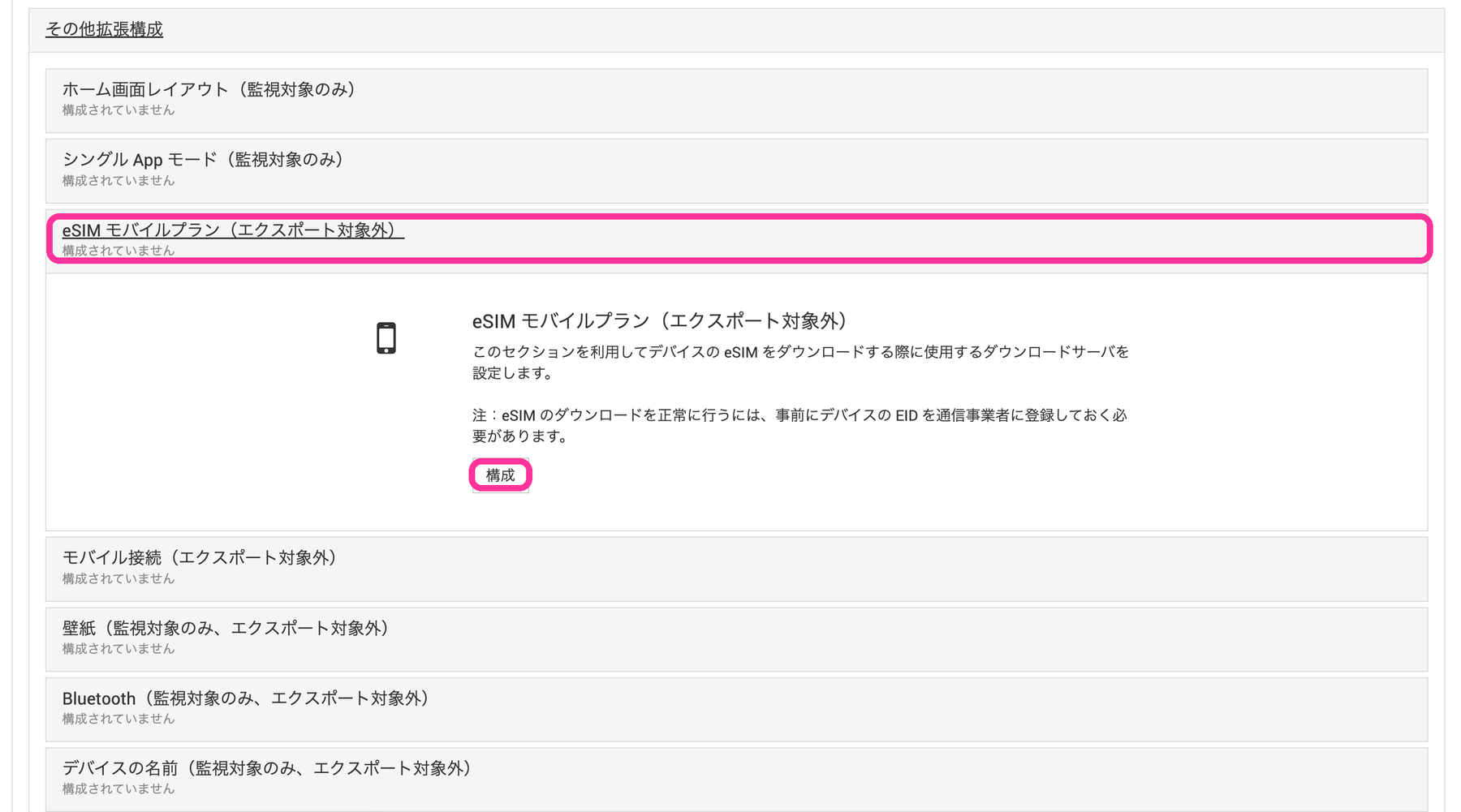
From Extended Configuration in the profile, open eSIM Mobile Plan (Not Exported) and click [Configure].
Enter the URL in eSIM Download Server.
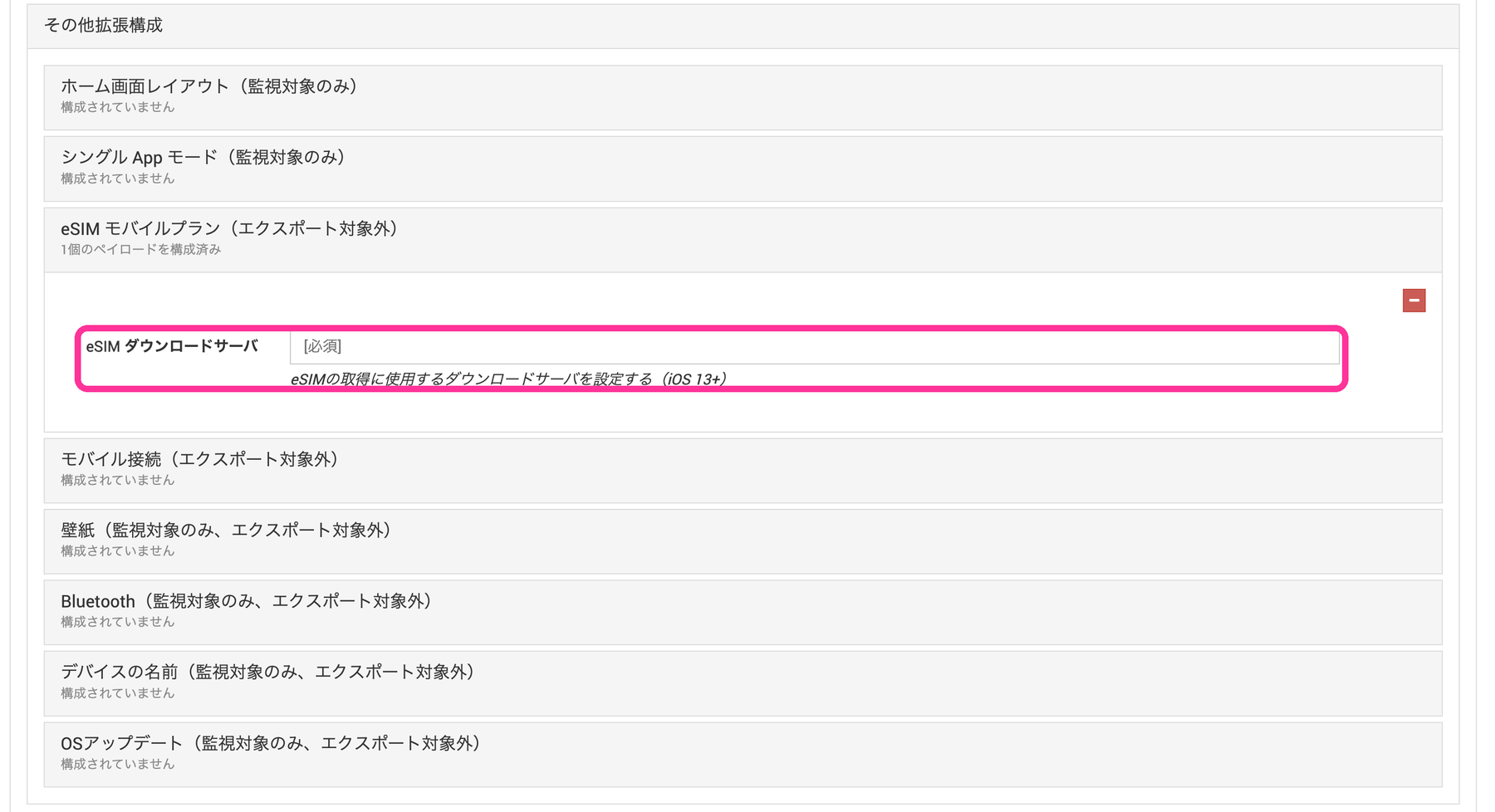
| Item | Details | Target Version |
|---|---|---|
eSIM Download Server | Enter the URL of the download server used to obtain the eSIM. This item is required. (Up to 255 characters) Use the URL provided by your mobile carrier. | iOS 13.0 or later |
Wallpaper (Supervised Only, Not Exported)
iOS8.0-
You can set the Home Screen and Lock Screen wallpapers of the device.
The configured wallpapers can be changed by the device user.
(Even if the device user changes them, the specified wallpapers are automatically restored by the sync process.)
To prohibit changes, turn Off Allow modifying wallpaper in the Restrictions payload.
Note: A profile that contains multiple different Wallpaper payloads cannot be distributed to a managed device.
Note: A wallpaper that has already been distributed cannot be removed from BizMobile Go!. To remove it, you must distribute a different wallpaper.
| Item | Details |
|---|---|
| Home Screen | Upload the image file to set as the Home Screen wallpaper. (PNG and JPG formats up to 3 MB are supported) |
| Lock Screen | Upload the image file to set as the Lock Screen wallpaper. (PNG and JPG formats up to 3 MB are supported) |
Bluetooth (Supervised Only, Not Exported)
iOS11.3-
You can configure the Bluetooth setting.
The configured Bluetooth setting can be changed by the device user.
(Even if the device user changes it, the specified Bluetooth setting is automatically restored by the sync process.)
To prohibit changes, turn Off Allow modifying Bluetooth settings in the Restrictions payload after the configuration is complete.
Note: A profile that contains multiple different Bluetooth payloads cannot be distributed to a managed device.
| Item | Details |
|---|---|
| Bluetooth | You can select the value to use for the setting from the following.
|
Device Name (Supervised Only, Not Exported)
iOS5.0-
You can set the name of the device.
If Allow modifying device name in the Restrictions payload is Off, the device name cannot be set, so you must first turn it On.
The configured device name can be changed by the device user.
(Even if the device user changes it, the specified device name is automatically restored by the sync process.)
To prohibit changes, turn Off Allow modifying device name in the Restrictions payload after the configuration is complete.
Note: A profile that contains multiple different Device Name payloads cannot be distributed to a managed device.
| Item | Details |
|---|---|
| Value to use for the device name | You can select the device name to use for the setting from the following.
|
OS Update (Supervised Only, Not Exported)
iOS14.5-
You can control the OS update path.
On devices running iOS 14.5 or later, the Software Update screen shows two OS versions that are available for update.
By controlling this, only updates to the OS versions that the administrator allows are displayed.
On devices running iOS / iPadOS 18 or later, macOS 15 or later, or tvOS 18.4 or later, Update path in the template's OS Update Management (DDM) takes precedence over this setting.
| Item | Details |
|---|---|
| Update path | Sets the update target versions displayed on the Software Update screen of the Settings app on the device. (Supervised only, iOS 14.5+)
|