Check Alarm History
The Alarm History screen displays all currently active alarms and all alarms that were resolved in the past.
LOG → Alarm History: Displays the alarm history.
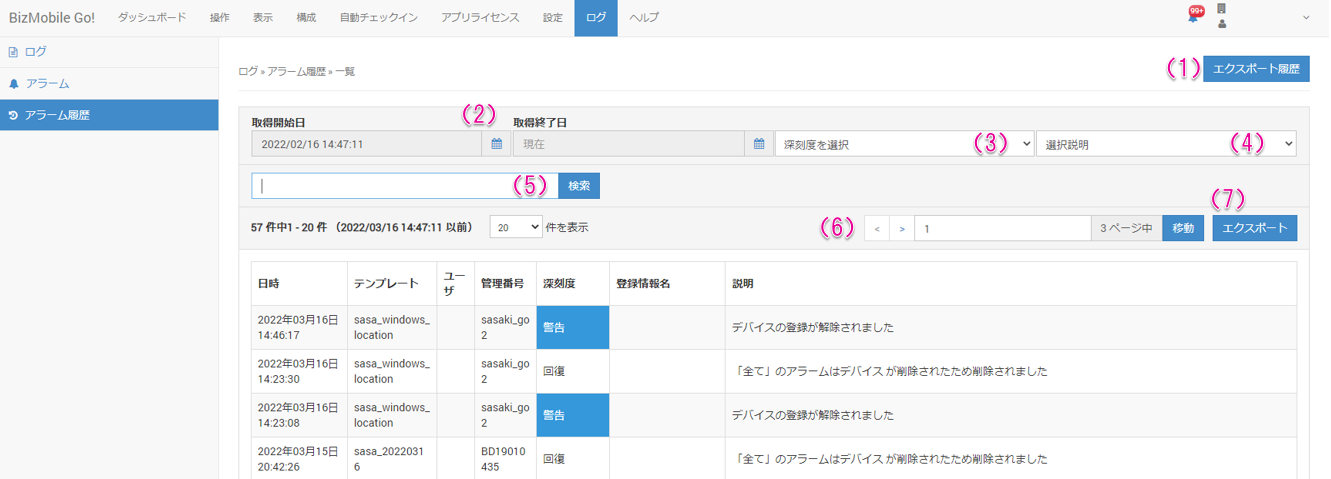
| Item | Description |
|---|---|
| (1) Export History | Displays the export history |
| (2) Specify start and end dates | Specify the start and end dates to search |
| (3) Select alarm severity | Select the severity to search |
| (4) Select type | Select the alarm category to search |
| (5) Keyword search | Enter what to search for |
| (6) Page number | Navigation for the page to display |
| (7) Export | Export alarm information |