Check the Event Log in the Admin Console
On the Event page, you can check the operations performed in BizGo! WorkTime, the user ID that performed them, and the device identifier.
Logs are retained for 90 days.
If Get location when starting/ending work is disabled in the policy, longitude and latitude are not recorded.
Check the event log
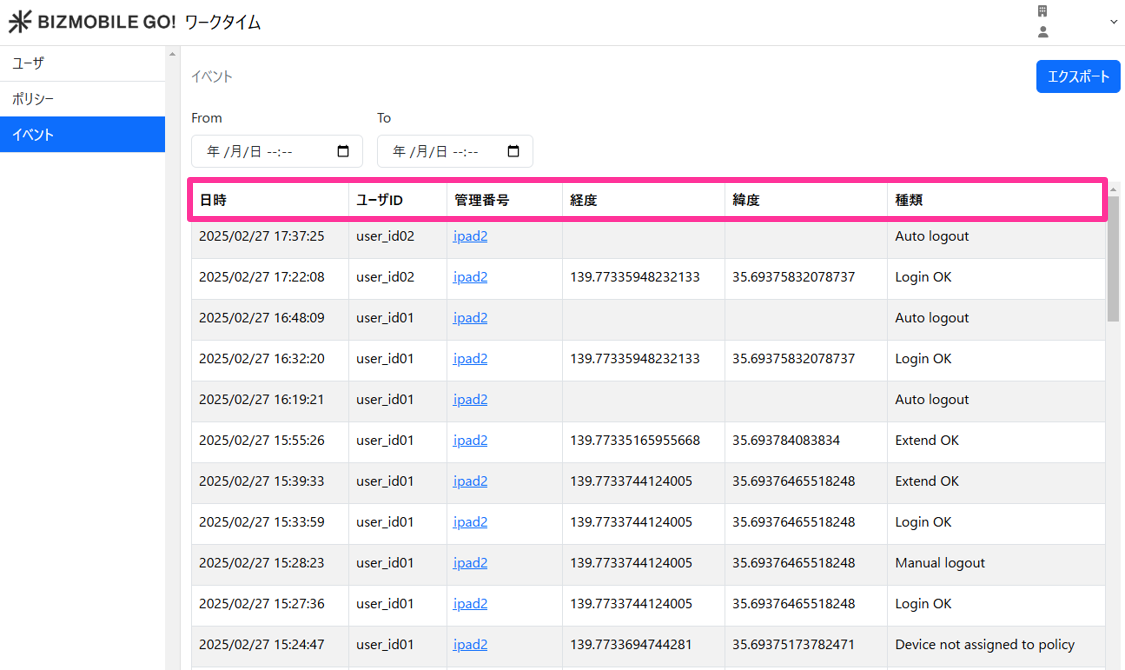
| Item | Value |
| Date and Time | Date and time the event occurred |
| User ID | User ID used to sign in |
| Identifier | Identifier of the device that signed in |
| Longitude | Longitude of the device |
| Latitude | Latitude of the device |
| Type | Event log information |
Export the event log
The following table shows the information included in the CSV export.
| timestamp | Date and time the event occurred |
| user_id | User ID |
| device_identifier | Identifier |
| log_type | Event content |
| device_location | Device location information (latitude longitude) |