View the User List in the Admin Console
You can view a list of the users who have signed in to the BizGo! WorkTime app.
User List
The list shows the users imported from a CSV file.
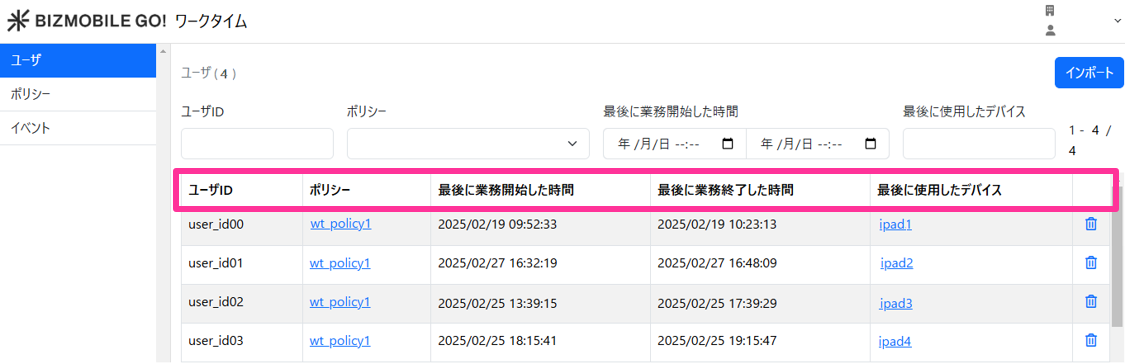
| Item | Value |
| User ID | The "User ID" used to sign in to BizGo! WorkTime |
| Policy | The name of the policy assigned to the user ID |
| Last work start time | The last time the user signed in to BizGo! WorkTime |
| Last work end time | The last time the user signed out of BizGo! WorkTime |
| Last used device | The last device that signed in with this user ID |
 | Delete the user ID |
Filter the Display
You can filter the user information displayed by multiple conditions.
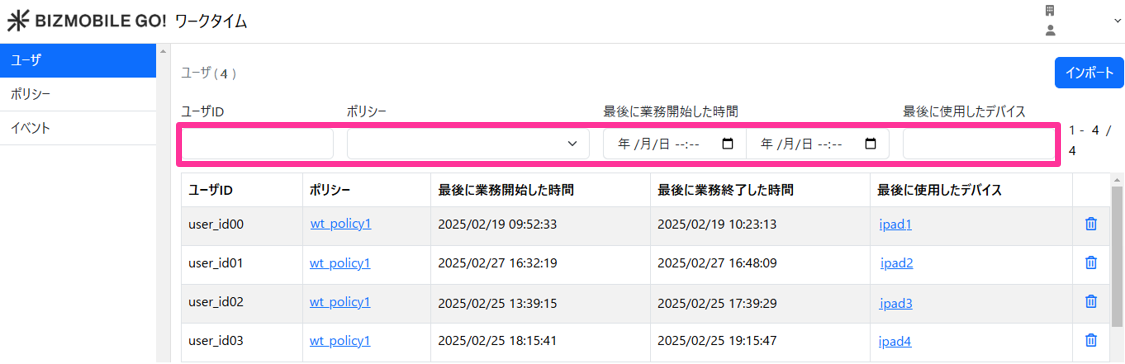
| Search item | Search condition |
| User ID | Partial match on the user ID |
| Policy | Select a policy |
| Last work start time | Specify the last work start time |
| Last used device | Partial match on the last used device |